Unyt Documentation
Overview
Unyt is peer-to-peer accounting infrastructure. Create currencies, automate economic agreements, bridge value across networks, and trade directly between any units — all without central servers, miners, or platform middlemen.
Every participant runs the application on their own device, maintains their own signed chain of records, and validates peers directly. There is no blockchain consensus, no mining, and no third party holding your funds. Fees are entirely configurable by the community — they can even be set to zero.
Unyt isn't a platform you sign up for. It's a template you customize. Each deployment — called a Unyt Alliance — defines its own currencies, rules, smart agreements, and governance. You can bridge between alliances, connect to EVM blockchains, and trade across currency boundaries with atomic guarantees.
What's in These Docs
- Getting Started — Download the pre-configured apps, learn about Zero Arc vs. Full Arc, and find links to the sandbox and technical resources.
- How It Works — How transactions, smart agreements, bridging, and fees actually work under the hood.
- Bridging Guide — Step-by-step walkthrough of setting up MetaMask and bridging tokens between Ethereum and Unyt, with screenshots.
- Concepts — Unyt as a template, currency design, architecture, and a glossary of key terms.
This documentation is actively expanding. If you need help with something not covered here, reach out in the Holochain Community Discord, (DEV.HC). Under the Projects channel, the Unyt thread is the best place to ask Unyt related questions.
Getting Started
The fastest way to get started is to download one of the available desktop Unyt Apps where you can experience payments, smart agreements, and bridging value across networks without having to configure your own system.
The current release (v0.54.0) ships two pre-configured apps that demonstrate different use cases. You can run either or both.
Next, start experimenting with Unyt in Moss, the peer-to-peer groupware for Holochain apps. We don't necessarily recommend using Unyt on Moss for a production system, but it is perfect for allowing you to quickly dive in and experiment with designing and operating your own Unyt Economic Engine.
Later, you can ask on the Holochain Community Discord or reach out to our team if you would like help using Unyt Sandbox to create your own Unyt app, launch currencies, set up smart agreements, bill, pay and transfer value to and from other Unyt based or EVM blockchain based networks.
Which App Should I Download?
- Holo Hosting — Configured to demonstrate what a Holo Hosting Unyt app might look like. Includes smart agreements for proof-of-service billing, invoicing, and service unit accounting. Also, demonstrates bridging to the Infrastructure Marketplace Unyt app as well as blockchain bridging with HOT (Ethereum Virtual Machine) tokens, multi-currency atomic trades, and cross-network value exchange.
- Infrastructure Marketplace — Configured for trading between monetary currencies from multiple external sources. Bridges to the Holo Hosting Unyt app.
Both apps support the full range of Unyt features — payments, trades, bridging, smart agreements, and currency configuration. The difference is in how they're pre-configured out of the box.
Note: To use blockchain bridging features, you'll need a browser-based wallet (e.g. MetaMask) installed and connected on your device.
Zero Arc vs. Full Arc
Each app is available in two versions:
- Zero Arc — A lightweight build that doesn't participate in the peer-to-peer network's data storage and validation. Good for trying out the interface and features quickly. Uses less resources.
- Full Arc — A full node that participates in the DHT (distributed hash table) and validates peers' data. This is the version you'd use for real network participation.
If you're just exploring, start with Zero Arc. If you want the complete peer-to-peer experience, use Full Arc.
Downloads — v0.54.0
Holo Hosting App
Zero Arc
Infrastructure Marketplace App
Zero Arc
All downloads are from the v0.54.0 GitHub release. macOS .app.tar.gz archives are also available there for command-line installation.
What You Can Do
- Create currencies — Define units of account with custom rules (credit limits, fees, membership criteria)
- Make payments — Send, request, and trade across currencies
- Set up agreements — Configure automated billing, escrow, revenue sharing
- Bridge networks — Connect separate Unyt instances and trade across them
- Bridge blockchain tokens — Lock EVM tokens on-chain and mirror them into a Unyt environment
If you run into issues, please let us know about them by posting in the Projects>Unyt thread on Discord by creating a New Issue in the Unyt sandbox repository describing the problem.
Running a Unyt App
When you download and run a Unyt app, you're not connecting to Unyt's servers. There are no Unyt servers. You and the other participants are the infrastructure. Each person runs the application on their own device, maintains their own signed record of actions, and communicates directly with peers.
First Launch: Setup and Key Generation
On first launch, you have the option to create a password. If you choose to set one, it is used in the generation of your cryptographic keys — it is never sent to Unyt or anyone else. This password cannot be changed and there is no recovery method if you lose it. If you prefer, you can skip the password and proceed without one.
The app then generates a public/private key pair and stores it in a local keystore (Lair) on your device. This key pair is your identity within the alliance — used for signing every transaction, validating peers, and all interactions. Your cryptographic key is your account.
Joining the Network
Your device connects peer-to-peer with others running the same app. The Network Status panel shows your connection type, number of active peers, data sent and received, and message counts. Once you've synced with at least one peer who has previously synced with the progenitor (the agent who initially configured the alliance), you'll receive your initial credit limit and can start transacting.
Zero Arc vs. Full Arc
- Zero Arc — A lightweight build that doesn't participate in DHT storage and validation. Your device still signs and records your own actions, but it doesn't store or validate other agents' data. Good for exploring features with lower resource usage.
- Full Arc — A full peer-to-peer node that participates in the distributed hash table and validates peers' data. This is the version you'd run for real network participation. Your device helps store and validate data for the community.
Pre-Configured Apps as Starting Points
The sandbox ships example apps (Holo Hosting, Infrastructure Marketplace) that demonstrate different configurations of the same engine. These are not different software — they're different configurations. Different Base Unit names, different Service Networks, different Smart Agreements, different fee policies. The underlying application is identical.
Running on Moss
Unyt also runs as a tool inside Moss peer-to-peer groups, alongside chat, documents, and other collaboration tools. Adding a payment system (and your own currencies) works the same way as adding any other tool to your group.
Starting Fresh
To reset completely: uninstall the app, delete local data (~/Library/Application Support/co.unyt.unyt on macOS), and reinstall. You'll get a new key pair and a fresh identity. Your previous identity's records remain on the network but that agent is effectively retired.
Further reading: Unyt on Moss, Unyt Sandbox README (GitHub), Phase 4 Testing Docs (GitHub)
Technical Resources
Unyt is built on Holochain and can be distributed directly or through Moss. Here are the key resources for each layer of the stack.
Unyt
- Unyt Sandbox (GitHub) — Setup instructions, README walkthrough, and example configurations
- Smart Agreement Code Library (GitHub) — Reusable [RHAI](https://rhai.rs) agreement templates with execution code and documentation
- Intro to Smart Agreements (GitHub) — Agent-centric foundations, three-layer architecture, RAVE validation
- Unyt Dictionary (GitHub) — Comprehensive glossary of Unyt terms and concepts
- Unyt Blog — Technical posts that serve as de facto documentation for features as they ship
Holochain
Unyt runs on Holochain, a peer-to-peer application framework. If you're building custom Unyt applications or extending the platform, you'll want to understand Holochain fundamentals.
- Holochain Developer Docs — Core developer documentation, concepts, and API reference
- Holochain Quick Start — Getting started with Holochain development
- Holochain GitHub — Source code, HDK reference, and examples
- Holochain Blog — Announcements, technical updates, and strategic direction
Moss / The Weave
Moss is peer-to-peer groupware built on Holochain. Unyt runs as a tool inside Moss groups, so members can add payments, currencies, and Smart Agreements alongside their other collaboration tools.
- Moss — Download Moss and get started
- The Weave — The vision and framework behind Moss, from Holochain co-founder Eric Harris-Braun
Simply go to the Tool Library in Moss, choose the Unyt app, and install it into a group that you have created or joined (assuming you have stewardship permissions for that group). Configure it as you wish and any other members of your group will get invited to use your Unyt app. See the Unyt on Moss blog post for a walkthrough.
How Transactions Work
Unyt transactions are peer-to-peer, multi-currency, and atomic. There is no central server processing payments. Each participant maintains their own source chain — an append-only log of cryptographically signed actions. When you commit a payment, you record it to your own chain. When your counterparty accepts, they record acceptance to theirs. Peers validate that both sides follow the rules.
Agent-Centric Foundation
In traditional payment systems, a central intermediary coordinates transactions. Unyt takes a fundamentally different approach. Each participant's device validates their own actions independently. There's no global ledger and no central coordinator deciding what happens. This is what enables multi-currency atomic transactions without a consensus mechanism, asynchronous operation without requiring both parties to be online at the same time, and automatic reclamation of funds without waiting for permission from a third party.
Pay (Send)
The simplest transaction. You send units to another agent.
- Enter the amount and unit(s). Select a contact by agent address or from your address book. Optionally add notes.
- Your device validates the transaction — checks the receiver's address format and confirms you have sufficient balance or credit.
- On success, your private key signs the transaction and your account is debited. A notification publishes to the receiver.
- The receiver sees the incoming payment in their Action List. They can accept (credits their account) or reject (funds automatically reclaim to your account).
Once you've committed, the transaction shows as "Completed" on your side — even if the receiver hasn't accepted yet. Your units have been debited. This is a distinctive characteristic of agent-centric accounting: "completed" means no further action is required from you.
Request
A Request is like an invoice. You propose that someone pay you.
- Create a request specifying the amount, unit(s), and the agent you're requesting from.
- No funds move yet. The request appears in the other party's Action List.
- They can choose to commit funds (debiting their account), or reject the request.
- If they commit, your device can auto-accept the incoming funds. If they reject, you simply receive a notification — there's nothing to reclaim because no funds were moved.
Trade
A Trade is a multi-currency exchange between two parties.
- Propose a trade: specify what you're offering (e.g. 100 Token A) and what you want (e.g. 50 Token B).
- The other party sees your proposal. They can accept the terms, reject, or counter-propose with different amounts or currencies.
- Negotiation continues until both parties agree or either party walks away.
- Once terms are acceptable, either party commits first. If the other accepts, the trade completes atomically — all debits and credits apply as a single all-or-nothing operation.
- If the second party rejects after the first has committed, committed funds automatically reclaim.
Multi-Currency Atomic Transactions
Any combination of currencies can move in a single all-or-nothing transaction. There are no trading pairs, no liquidity pools, and no intermediate hops. You specify what you're offering and what you want. If both parties agree, the exchange happens atomically.
In a marketplace context, a conversion table is maintained (for example, updated daily) that references each unit to its price in a common denomination. This enables calculation between any participating units. Prices can be derived from actual economic activity and utility rather than speculative trading.
Asynchronous Operation
Participants don't need to be online simultaneously. Actions record locally first, then propagate peer-to-peer when participants reconnect. Your device can initiate a payment, sign it, and debit your account even if the receiver is currently offline. When they come back online, the notification reaches them and they can accept. That said, particular smart agreements can be designed in ways that request information online before allowing a participant to take that particular action.
Further reading: Smooth Payments, Beyond Trading Pairs: Atomic Multi-Currency Trades
How Smart Agreements Work
Smart Agreements are programmable rules governing how value flows, how credits are extended, and how participants coordinate. They are the closest thing in Unyt to blockchain smart contracts — but built on a fundamentally different architecture.
Agreements, Not Contracts
Smart Agreements don't rely on courts or legal systems for enforcement. They rely on mutual enforcement: participants validate each other's actions according to shared rules. Unlike blockchain smart contracts, where agency is ambiguous (who authorized this?), each Holochain agent takes explicit responsibility for their own actions. Every action is signed by a specific agent's private key.
Soft-Coded vs. Hard-Coded
Traditional Holochain apps bake rules into the DNA — changing them means releasing a new version and migrating everyone. Smart Agreements make many rules configurable: they're still validated by peers, but they can evolve without rebuilding the application. One application can power radically different currencies and use cases through configuration alone.
The Three-Layer Architecture
Smart Agreements have three layers, each building on the one before it:
1. Agreement Code Template
Reusable logic that defines:
- An input schema (JSON) — what data the agreement needs
- Execution code ([RHAI](https://rhai.rs) script) — what the agreement does with that data
- An output schema — what the agreement produces
Templates can be shared across agreements. The Smart Agreement Code Library on GitHub provides reusable templates for common patterns.
2. Smart Agreement
A specific implementation that binds a template to its context:
- Who can execute it — anyone, or only an authorized agent
- What roles exist and who qualifies for each role
- Where each input comes from — provided by a role, provided by the executor, a fixed value, or a query result
3. RAVE (Recorded Agreement Verifiably Executed)
The artifact produced after an agreement executes. A RAVE contains the inputs used, the agreement executed, and the outputs produced. Any participant can independently verify the execution was valid by:
- Confirming executor authority
- Validating input and output schemas
- Checking that inputs came from their declared sources
- Re-running the execution code to confirm outputs match
- Verifying that units in = units out (conservation law)
How RAVEs Work with Payments
When a RAVE allocates Base Units to a receiver, the receiver still must explicitly Accept. Their device independently checks validity before signing the acceptance. You can't force credits on someone. Fraud requires collusion — and violators get excluded by peers who detect the rule violation on their signed source chain.
Core Agreement Patterns
The Smart Agreement Code Library includes templates for common patterns:
- Compute Credit Limit — Dynamically calculates how much credit an agent can access, potentially based on transaction history, manual adjustments, and network position. Runs automatically when an agent tries to spend into the negative.
- Conditional Forward — Escrow-like logic: if a condition is met, funds go to the receiver. If not, they return to the spender.
- Aggregate Requests — Collects multiple invoices and spend allocations, matches payments to invoices, and automatically refunds excess. Supports bulk processing.
- Aggregate Payment — Pools incoming spends and forwards them to a designated receiver.
- Bridging — Manages deposit and withdrawal state for blockchain-bridged tokens, tracking balances per contract address.
- Proof of Service — Validates that services were actually rendered, and ties service provision to credit limits and redemption eligibility.
DePIN Billing: An End-to-End Example
Smart Agreements enable lightweight billing for machine services. Here's how the DePIN billing flow works:
- Logging: Resource-constrained devices (e.g. drones, edge nodes) append JSONL log lines as work happens. The device doesn't need to understand invoicing — it just appends to a log file.
- Log collection: A Log Sender ships logs to a Log Collector — a lightweight handoff.
- Invoice generation: A Log Harvester reviews logs, checks proofs, and generates invoices.
- Agreement execution: Invoices attach to a Smart Agreement. The customer pays and executes the agreement.
- Settlement: The service provider collects. Total cost: approximately 1% of payment value.
Each step is a single agent taking a single action and passing forward. No heavyweight infrastructure required.
Creating Agreements
Agreements are created in the Build Panel (accessible in Dev Build Mode within the app). You define a Code Template with its input/output schemas and RHAI execution code, then create a Smart Agreement that binds that template to specific roles and input sources. Published templates appear in the Library for the whole alliance to use.
Further reading: Unveiling Unyt Smart Agreements, Elegant Billing for the Machine Economy, Intro to Smart Agreements (GitHub), Smart Agreement Code Library (GitHub)
How Bridging Works
Bridging connects separate value systems so units can flow between them. Unyt supports two kinds of bridging: between Unyt networks (inter-network) and between Unyt and EVM-compatible blockchains.
Bridging Between Unyt Networks
Separate Unyt Alliance Apps can be connected so value flows between them. Each network keeps its own governance, rules, currency, and autonomy — bridging is a connection, not a merger.
How It Works
A bridge is established between two Unyt Alliances. A Bridge Agent is authorized within each alliance's Service Network to manage the flow of units between them. The bridge uses Smart Agreements — specifically Purchase and Redemption agreements — to handle conversion and transfer.
- Purchase Agreement: An agent in Alliance A sends units to the Bridge Agent, which credits corresponding units in Alliance B.
- Redemption Agreement: The reverse — an agent in Alliance B redeems units, and the Bridge Agent releases units in Alliance A.
The Marketplace Model
Multiple projects can each bridge their units into a shared Unyt instance, creating a marketplace where any participating currency can be spent for any other — without external exchanges. Conversion tables define rates between units, potentially updated daily based on actual economic activity. Each project maintains full autonomy over its own network. Bridging adds utility — more places your currency can be spent — without changing supply dynamics.
Blockchain Bridging (EVM)
Unyt can bridge to any EVM-compatible blockchain (Ethereum, Polygon, Arbitrum, etc.), enabling on-chain tokens to be represented and used within a Unyt environment.
Bringing Tokens In
Lock ERC-20 tokens in a smart contract on the EVM chain, specifying the destination Unyt app and your agent address. The bridge agent monitors the blockchain, detects your lock transaction, waits for sufficient block confirmations, then executes a bridge Smart Agreement that credits wrapped tokens to your Unyt address. The bridging agreement tracks deposit and withdrawal state per contract address.
Note: A browser-connected wallet (e.g. MetaMask) is required to interact with the EVM blockchain.
Taking Tokens Out
Initiate a transfer out from within the Unyt app, specifying your blockchain destination address. The bridge agent executes the bridge Smart Agreement and produces a cryptographic coupon — signed using EVM-native methods (KECCAK-256 hashing, ECDSA signatures). Present this coupon to the blockchain smart contract, which independently verifies the signature and releases your tokens.
Verification
Every lock and unlock is a standard blockchain transaction, visible on Etherscan or any block explorer. The bridge doesn't hide anything behind opaque off-chain processes — the on-chain side is fully transparent.
What This Enables
Effectively, your own configurable L2. Once tokens are bridged into Unyt, they get access to smart agreements, customizable fees (including zero), direct multi-currency trading, and bridging to other Unyt apps — capabilities that typical L2 solutions don't offer.
Further reading: Unyt Bridging: Connecting Value Networks, Blockchain Bridging: Your Own Configurable L2
Blockchain Bridging Guide
This walkthrough covers the full process of bridging ERC-20 tokens between the Ethereum Sepolia testnet and a Unyt app. You will set up MetaMask, get test tokens, lock them on-chain, and receive wrapped tokens inside Unyt.
1. Install and Configure MetaMask
MetaMask is a browser-based Ethereum wallet. You need it to sign blockchain transactions for bridging.
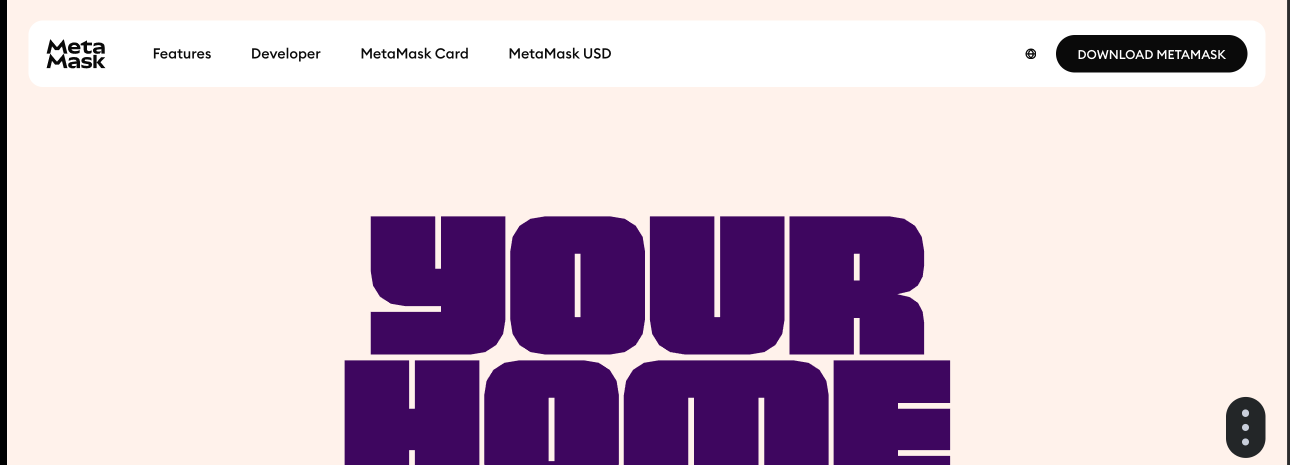
Install the Extension
Visit metamask.io and install the browser extension for Chrome, Firefox, Brave, or Edge.
Create or Import a Wallet
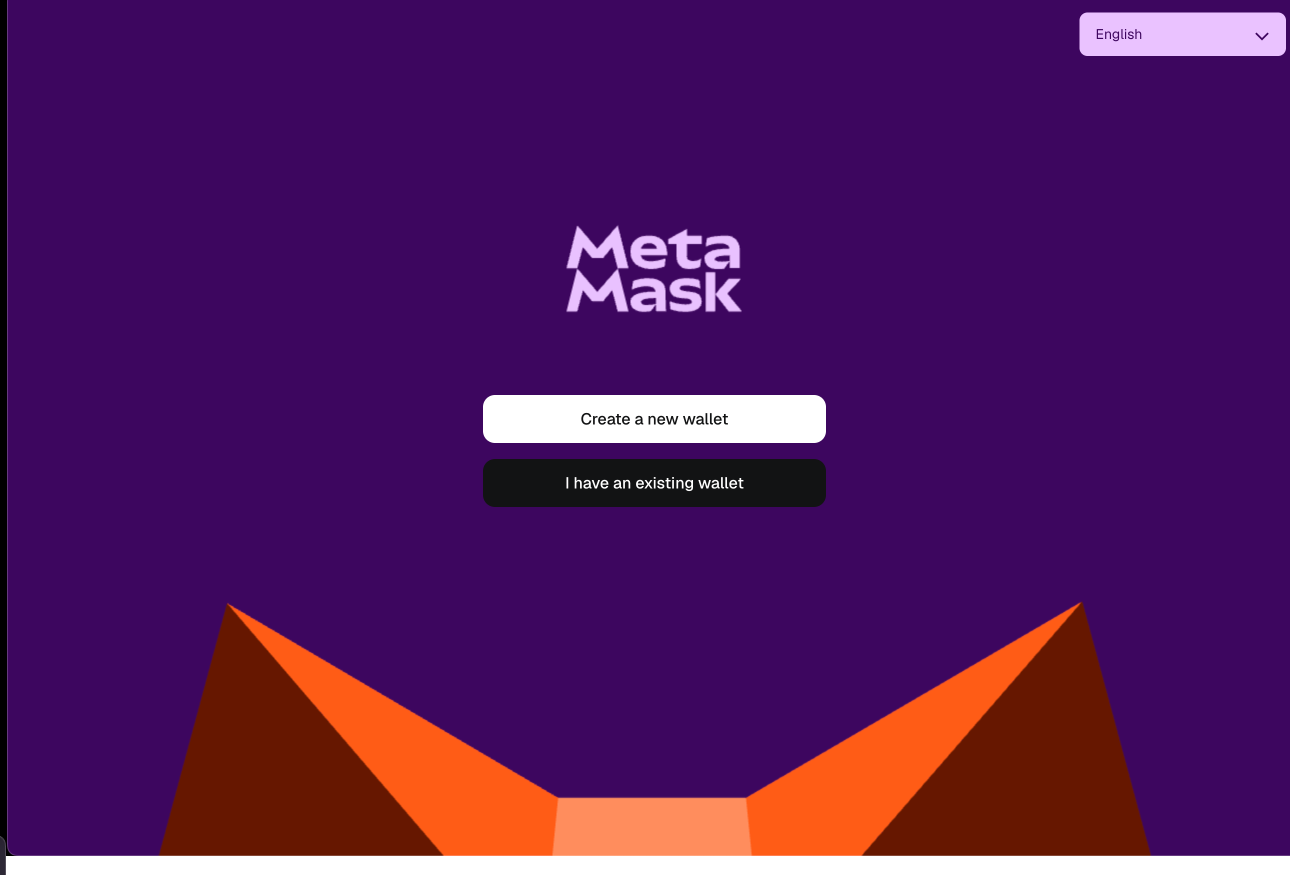
When you first open MetaMask, you'll be asked whether to create a new wallet or import an existing one using a secret recovery phrase.
Enable Test Networks
By default, MetaMask only shows mainnet. To use the Sepolia testnet, you need to enable test networks:
- Click the network selector in MetaMask (accessible in the dropdown menu).
- Select Networks.
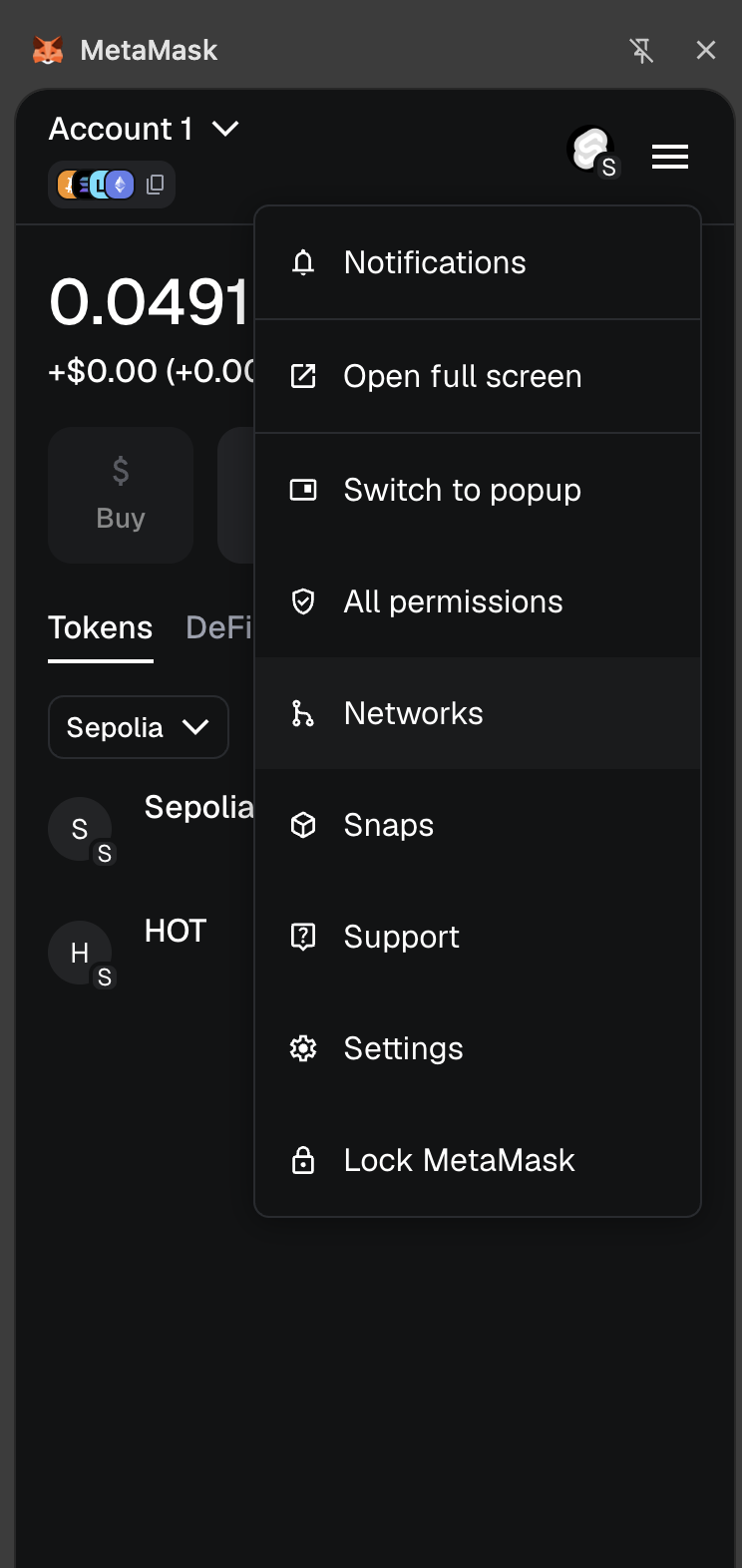
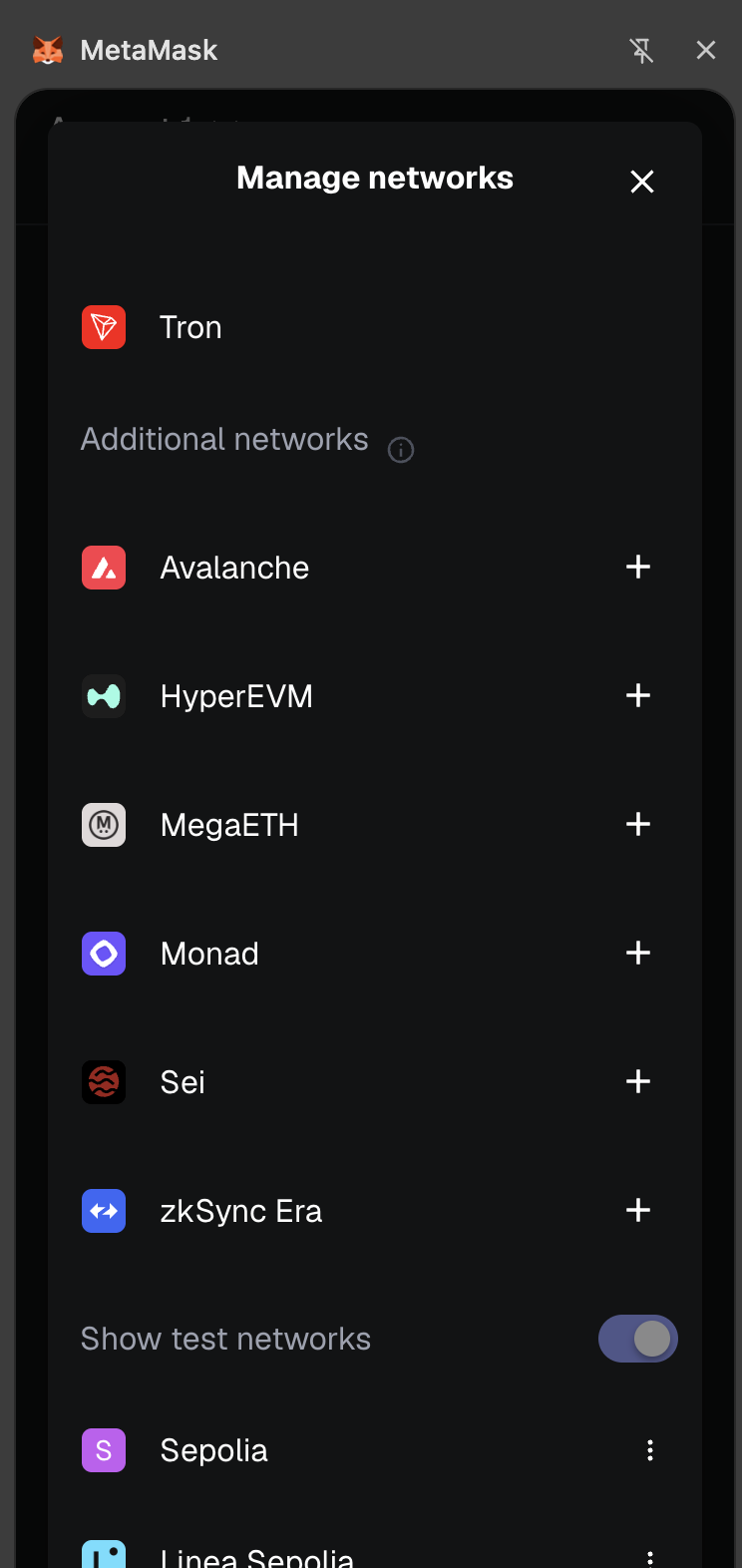
in the Manage networks menu, scroll down and toggle on Show test networks.
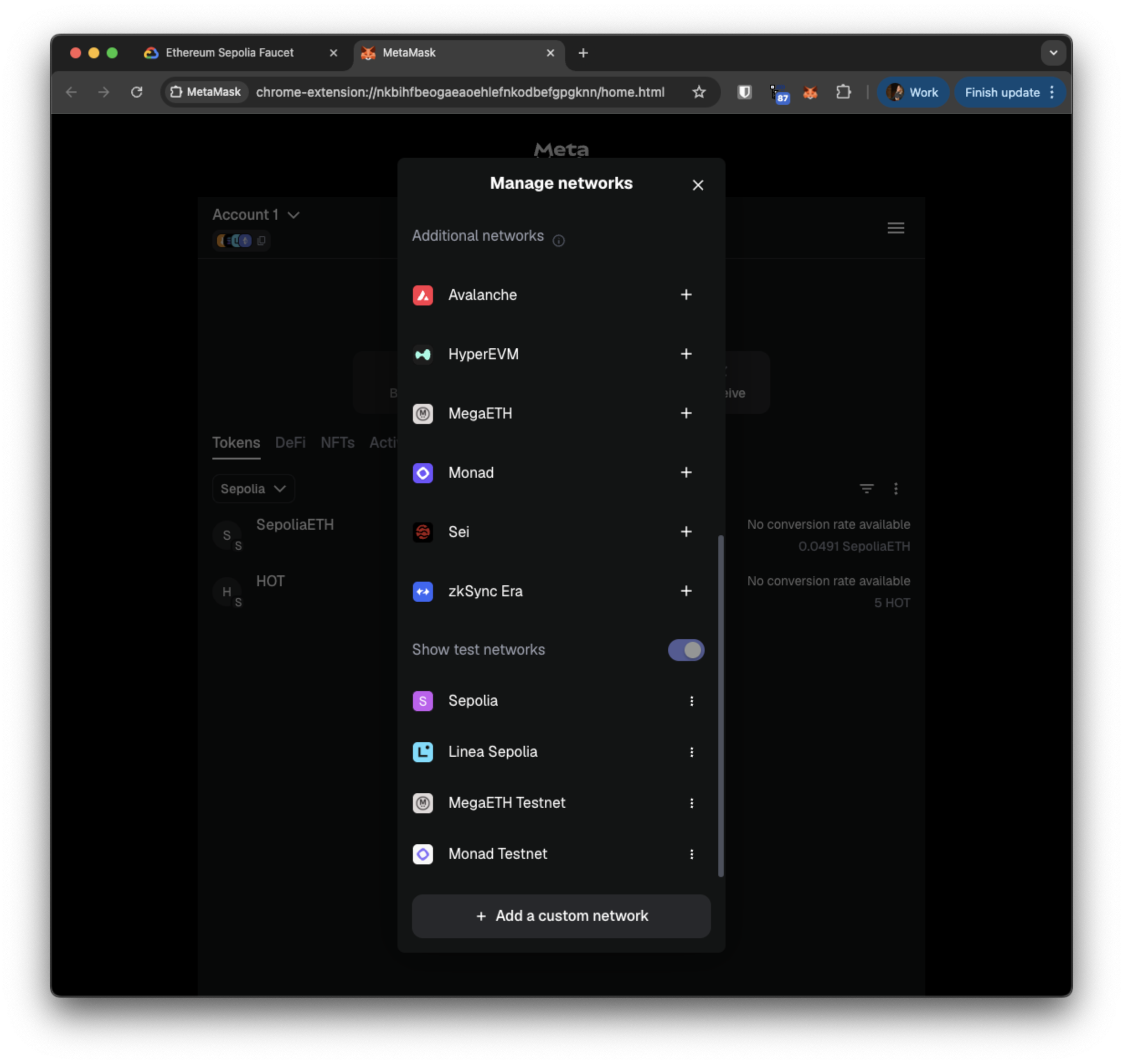

After you enable Show test networks, you should see Sepolia in the network list.
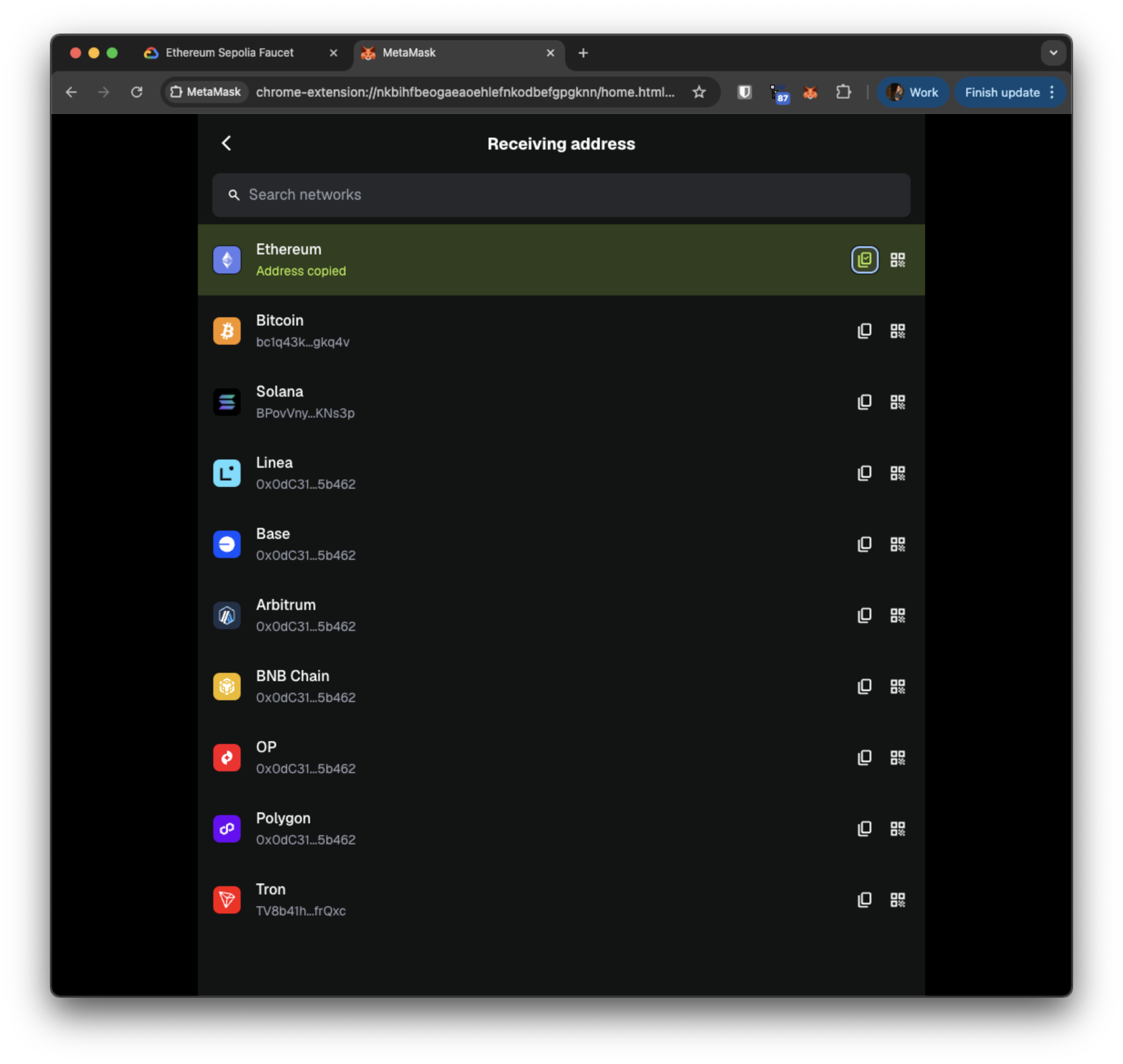
Copy Your Ethereum Address
Switch to the Sepolia network, then copy your wallet address — you'll need it for the faucets and for bridging.
2. Get Sepolia Test ETH
You need a small amount of Sepolia ETH to pay gas fees for lock and unlock transactions.
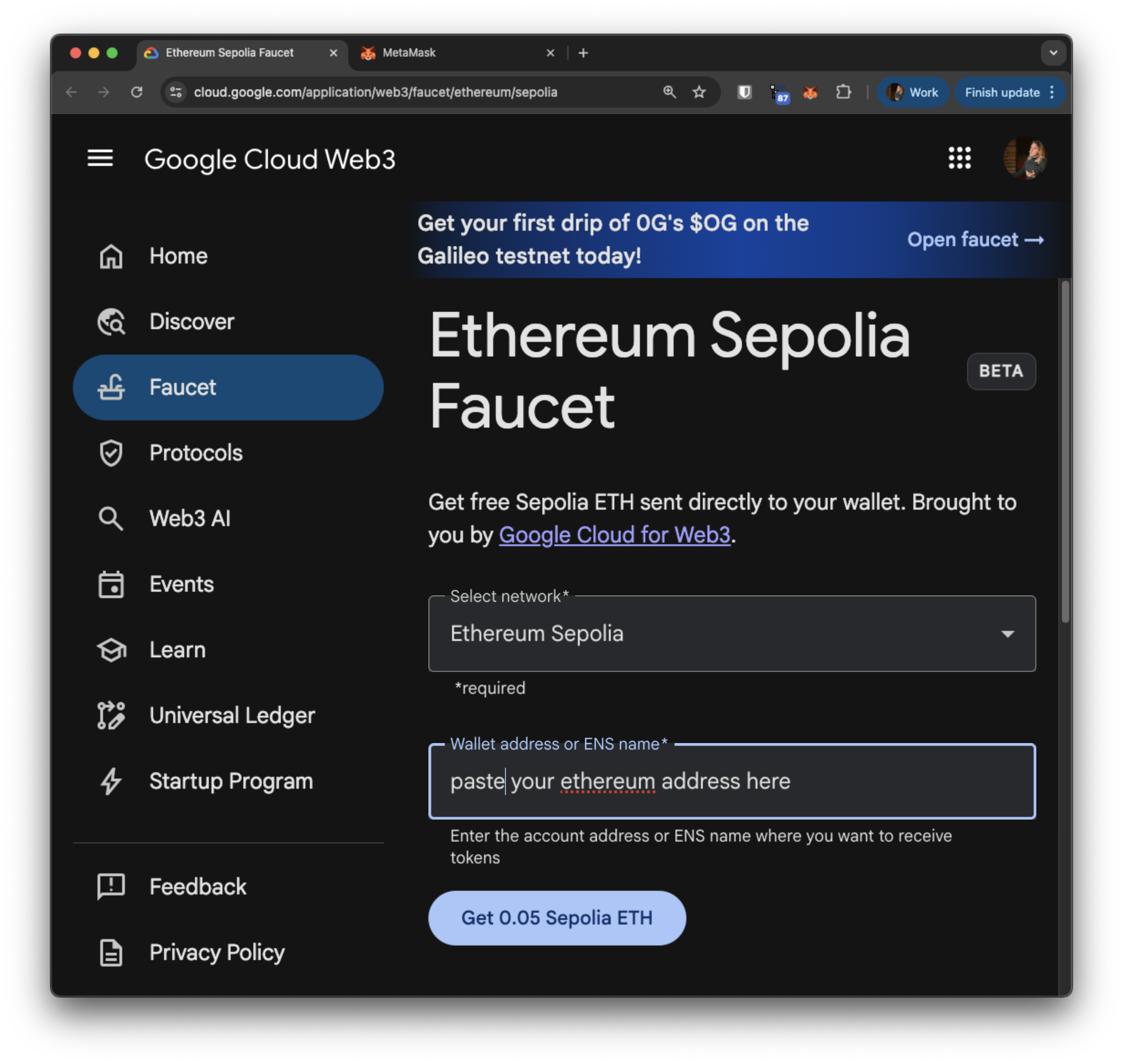
- Go to the Google Cloud Sepolia Faucet.
- Paste your Ethereum address from MetaMask.
- Click "Get 0.05 Sepolia ETH".
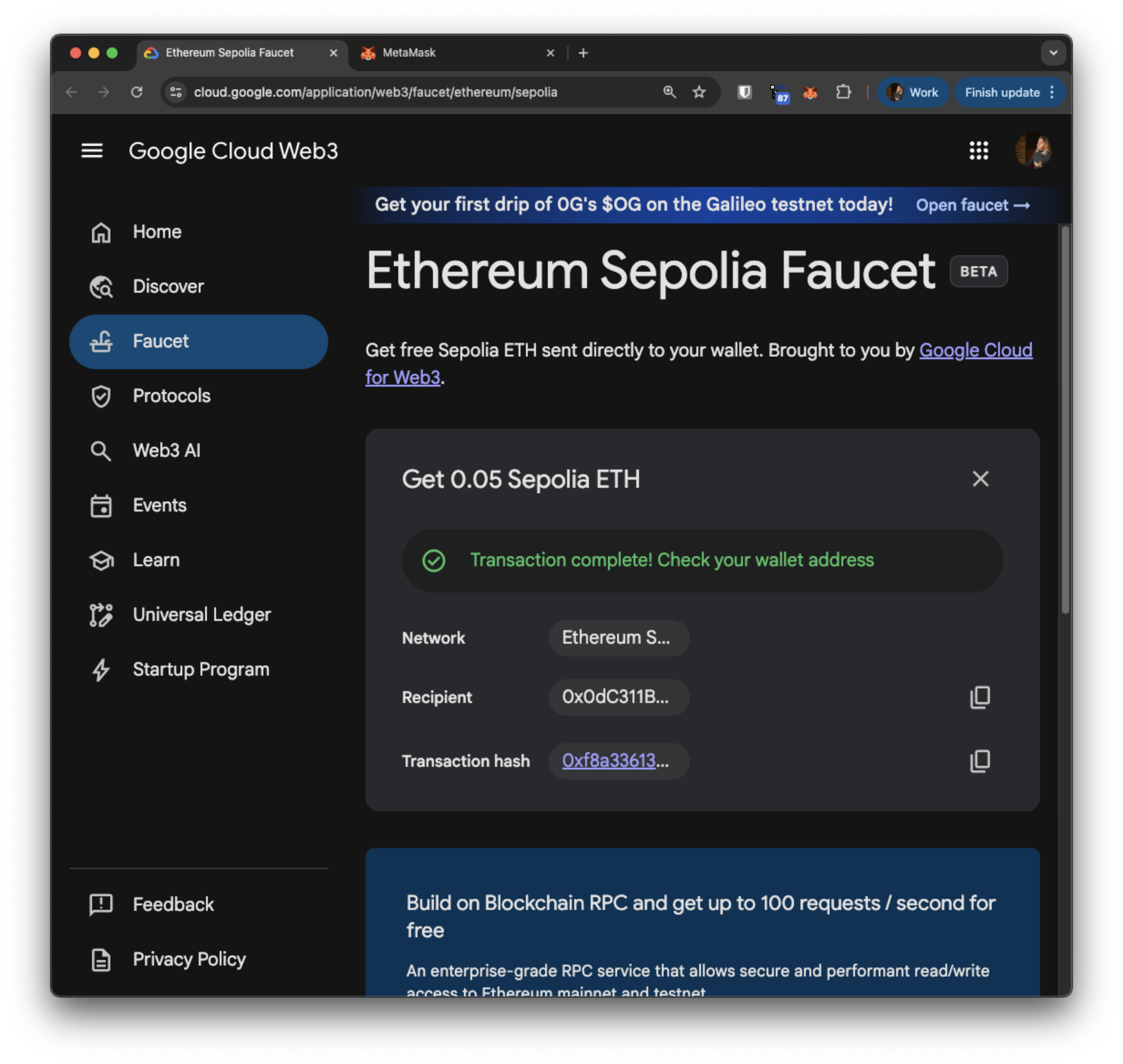
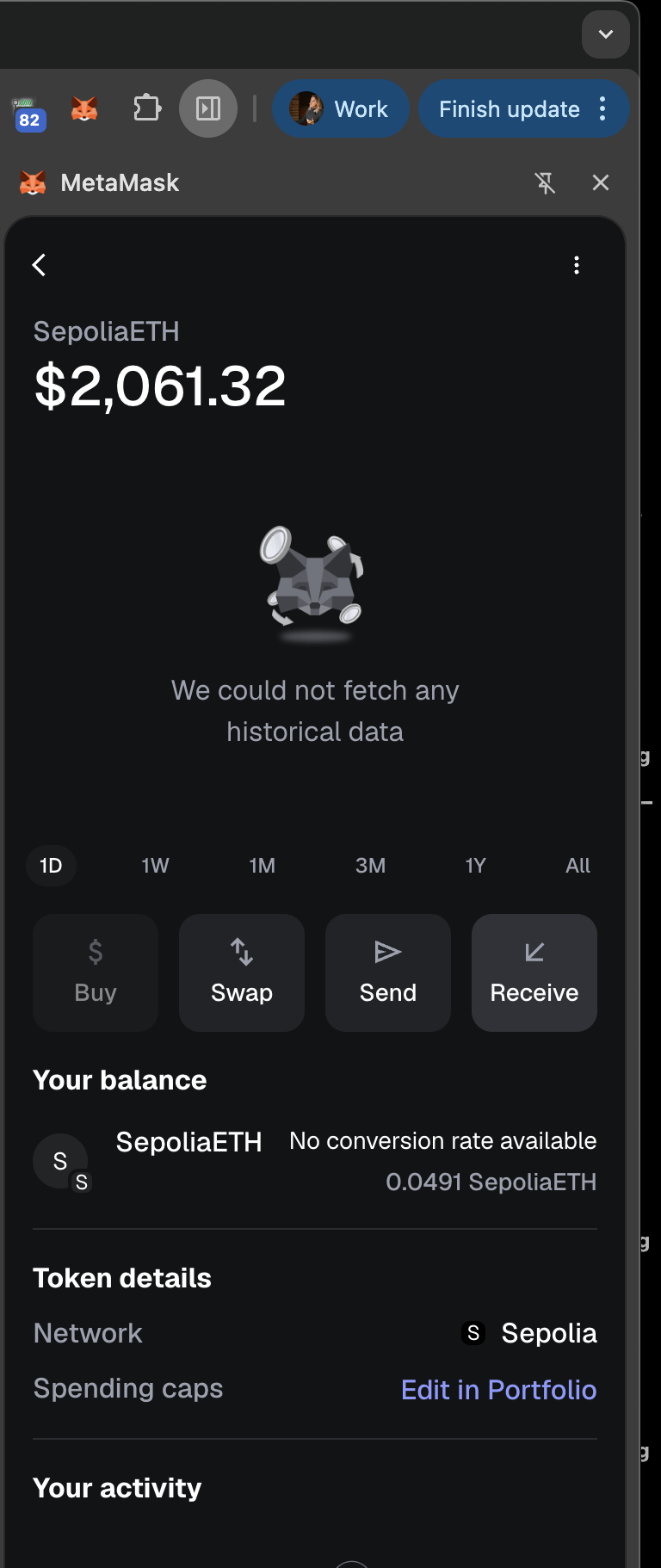
After a moment for the transaction to process on the blockchain, you should see the ETH balance in MetaMask on the Sepolia network.
3. Get Mock HOT Tokens
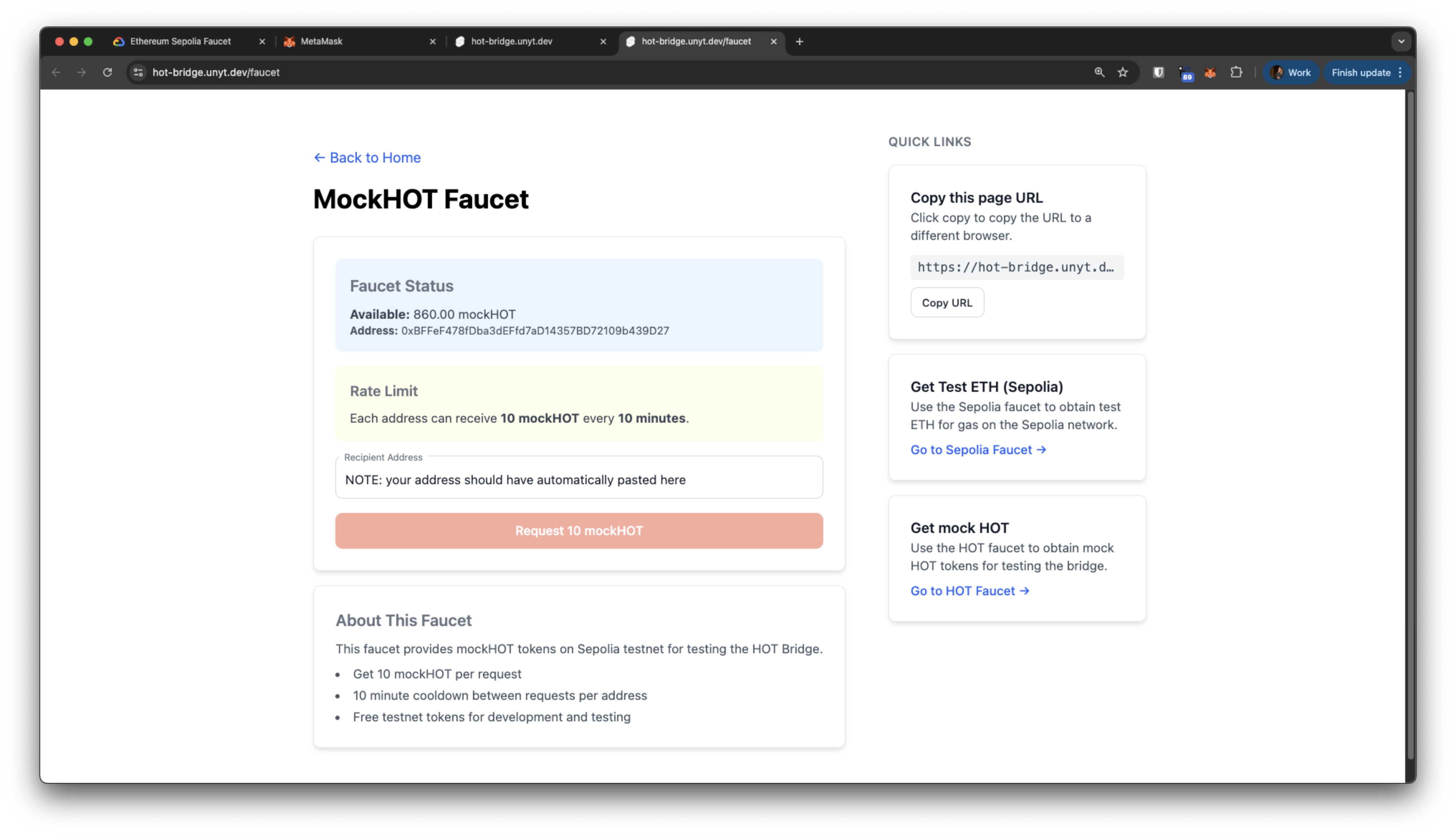
The test environment uses a mock HOT ERC-20 token deployed on Sepolia. You get these from the Unyt bridge page.
- Navigate to hot-bridge.unyt.dev.
- Click Connect Wallet. (assuming, you are logged in, this should add the correct network details).
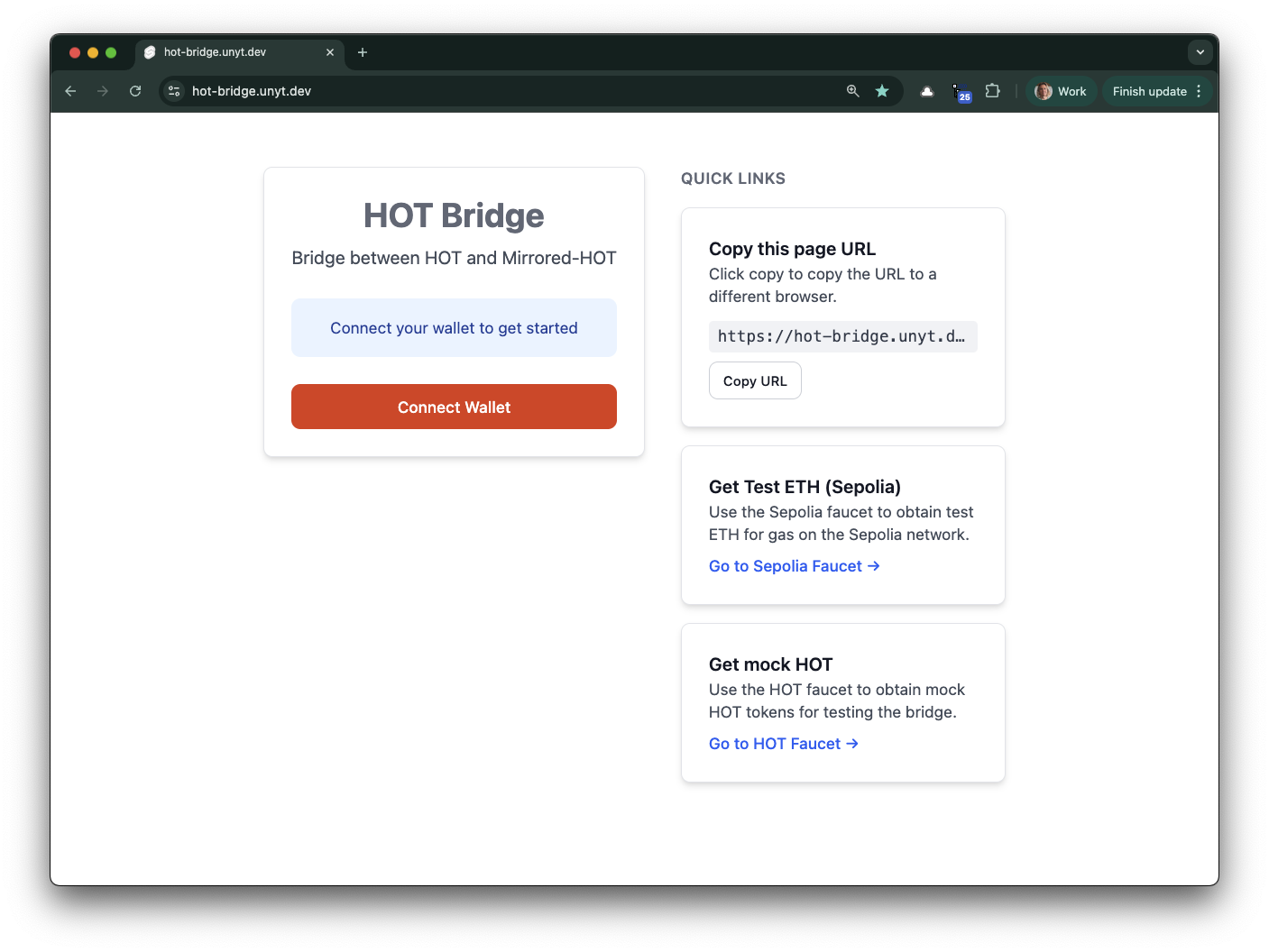
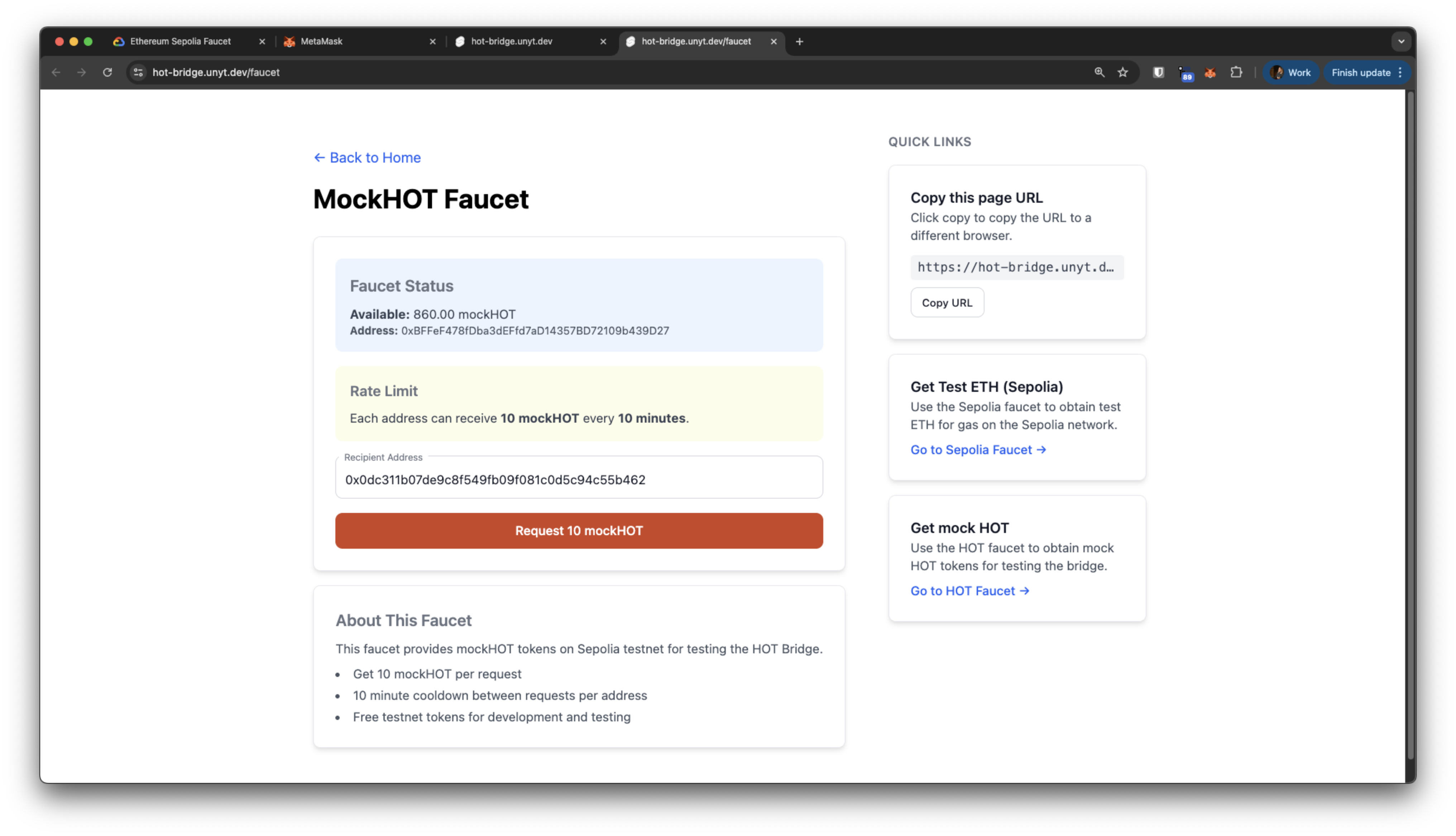
- Click "Get mock HOT".
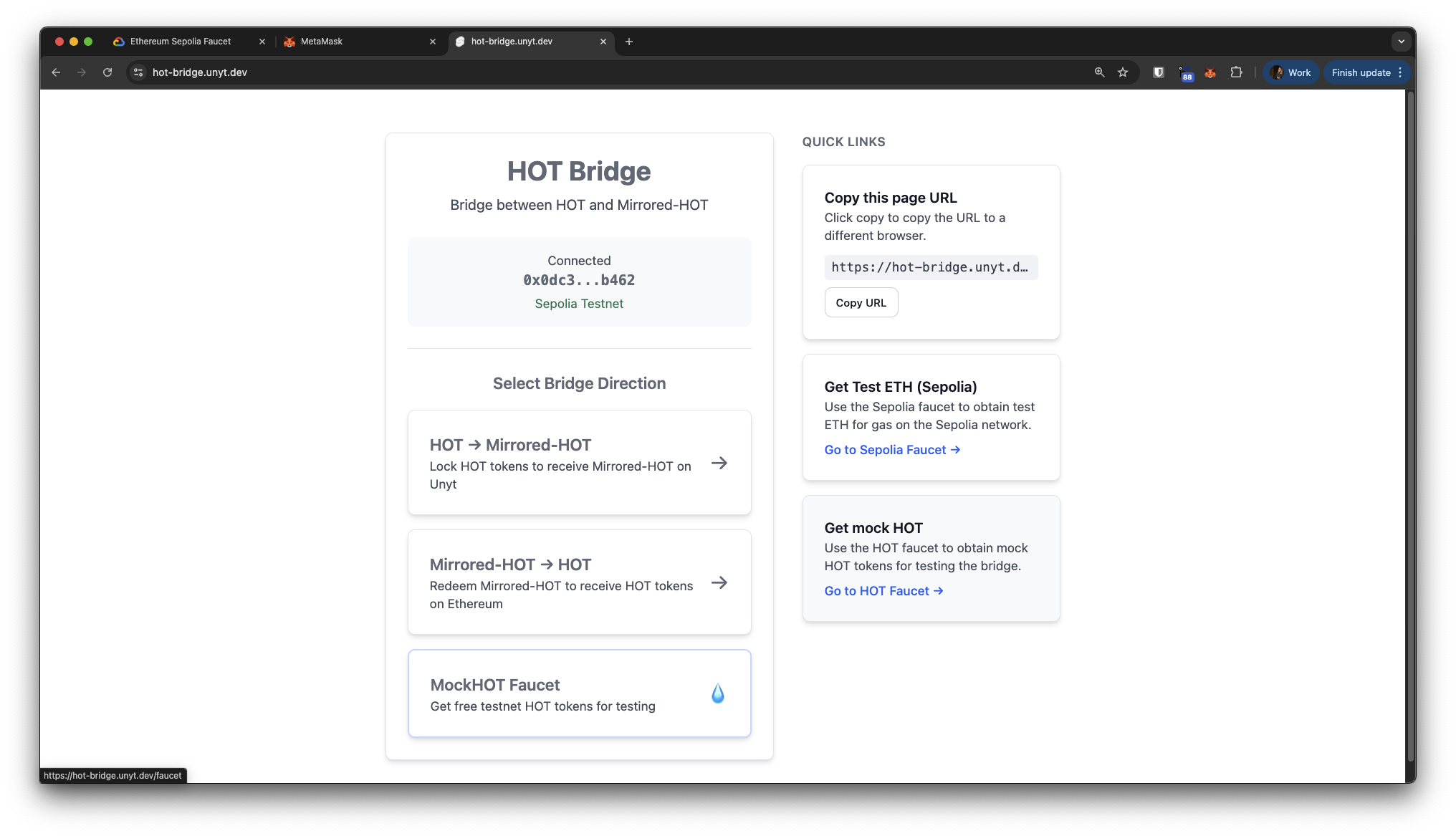
- Your wallet address should auto-fill. Click Request 10 mockHOT.
Import Mock HOT into MetaMask
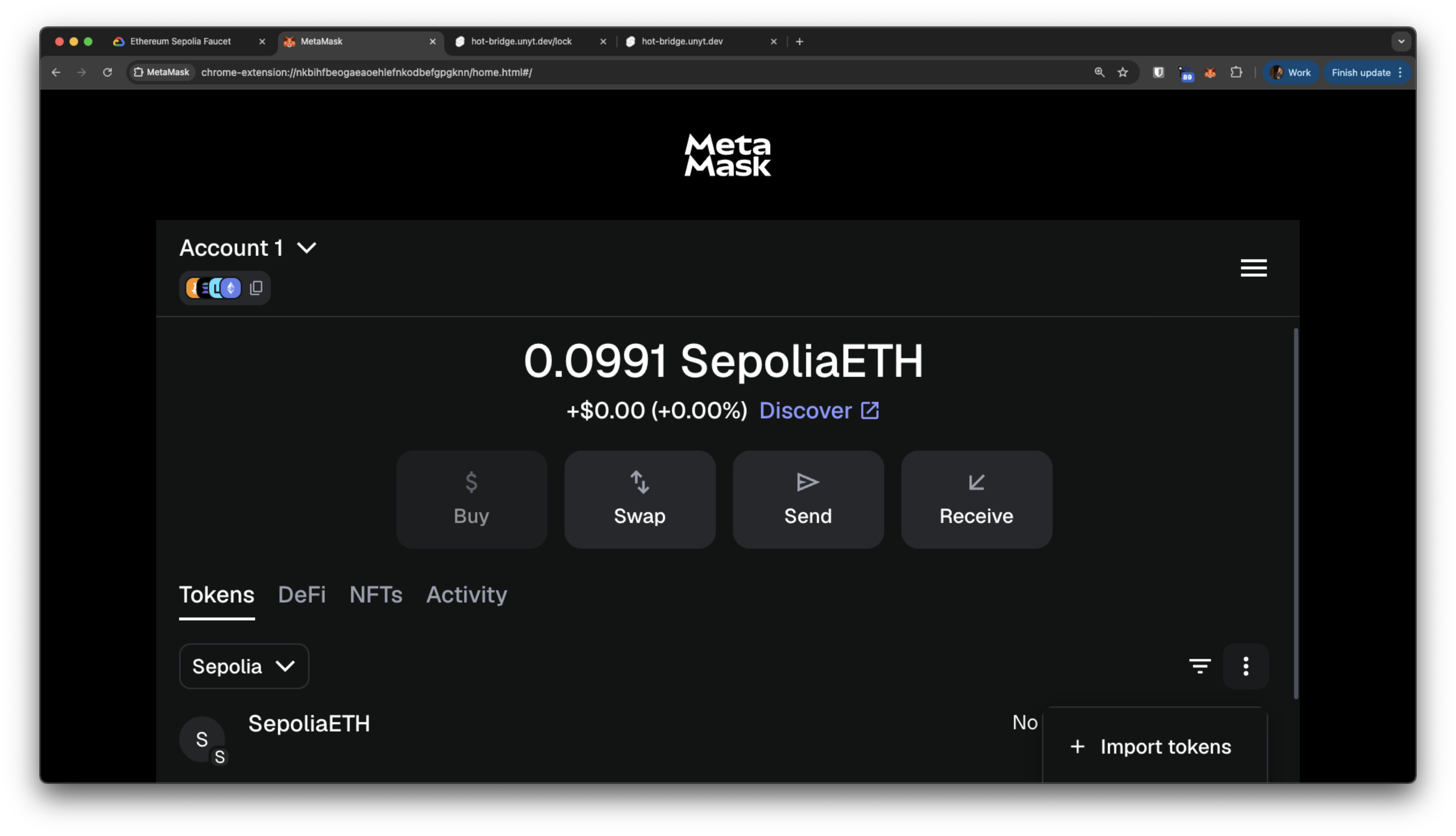
To see your mock HOT balance in MetaMask, import the token:
In MetaMask, under the Tokens tab, with Sepolia selected, click the 3 dot menu on the right, then select Import tokens.
Paste the contract address: 0xeaC8eEEE9f84F3E3F592e9D8604100eA1b788749
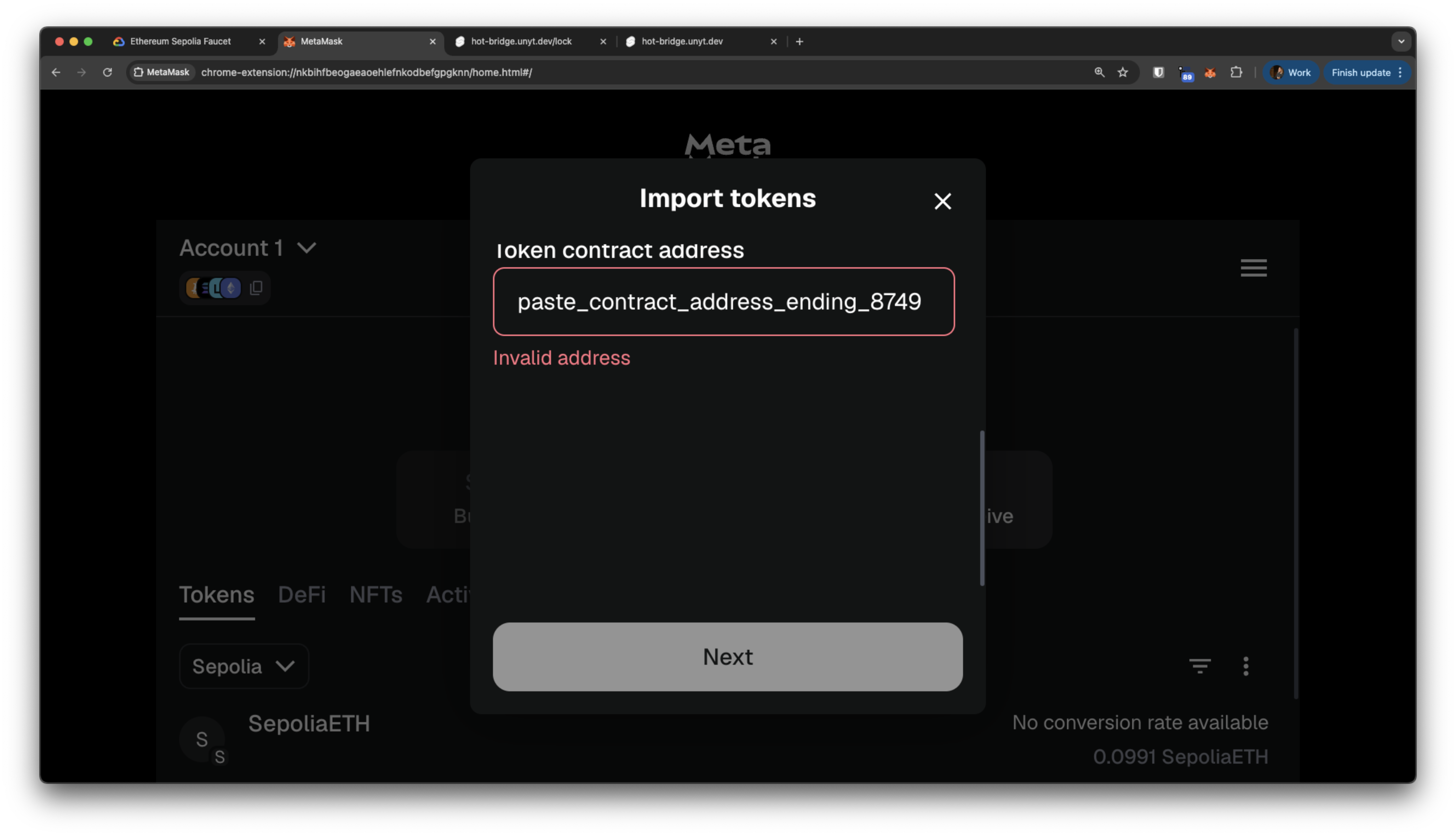
Click Next to confirm the import.
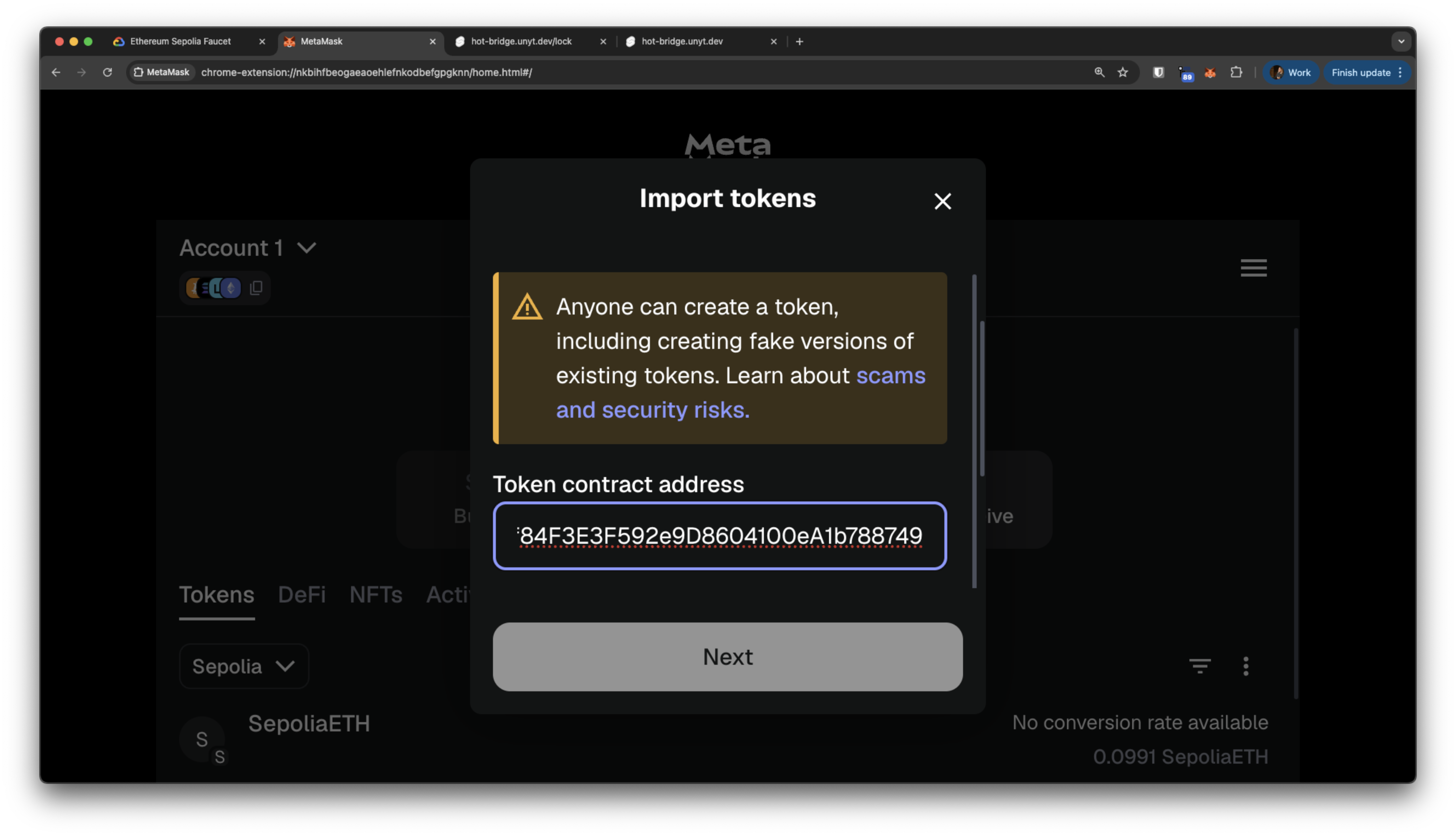
Now you should see a HOT balance in your wallet (under Sepolia)
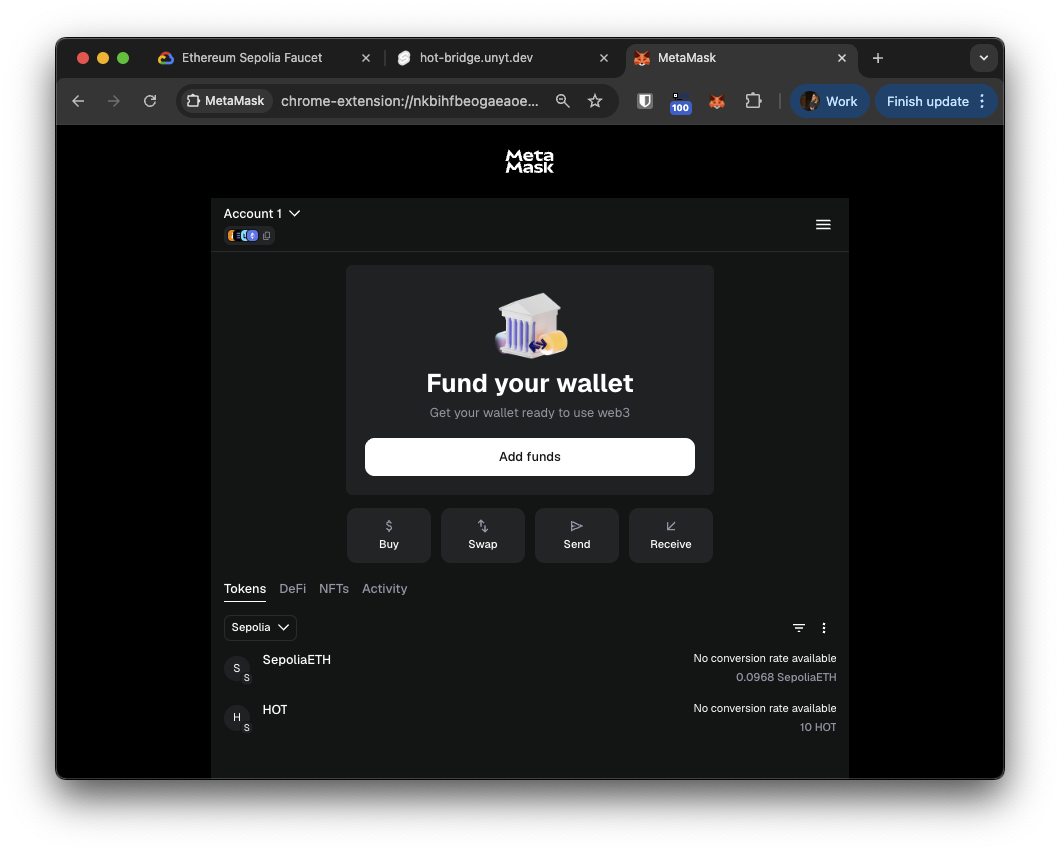
4. Transfer In: Lock on Ethereum, Mirror in Unyt
Now you'll lock mock HOT tokens on the Sepolia blockchain and receive wrapped HOT inside the Unyt Holo Hosting app.
Initiate the Transfer on the Holo Hosting Unyt app
Open the Unyt Holo Hosting app.
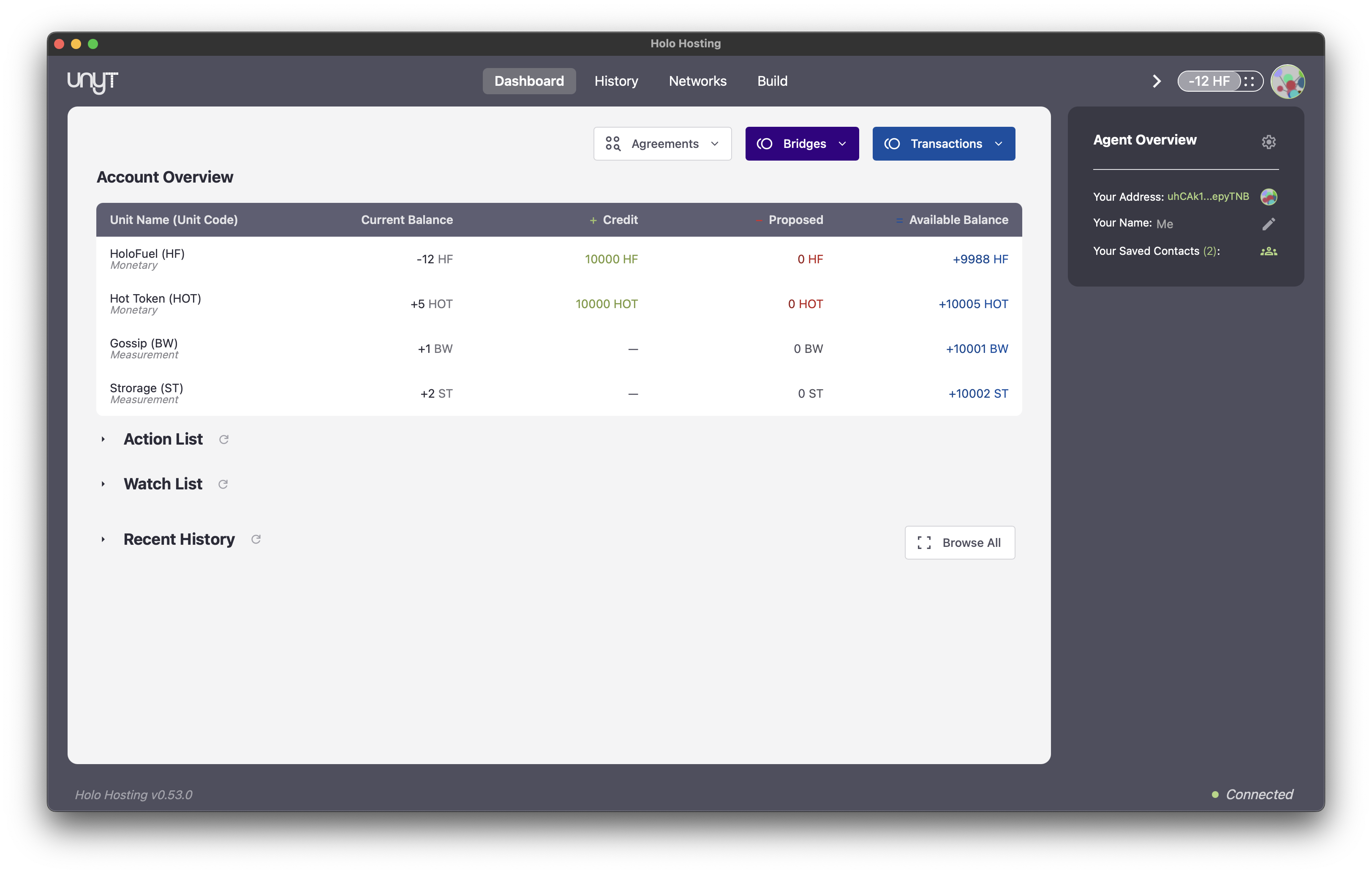
Start the Transfer In
- In the Unyt Holo Hosting app, navigate to the Bridges section and select Transfer In.
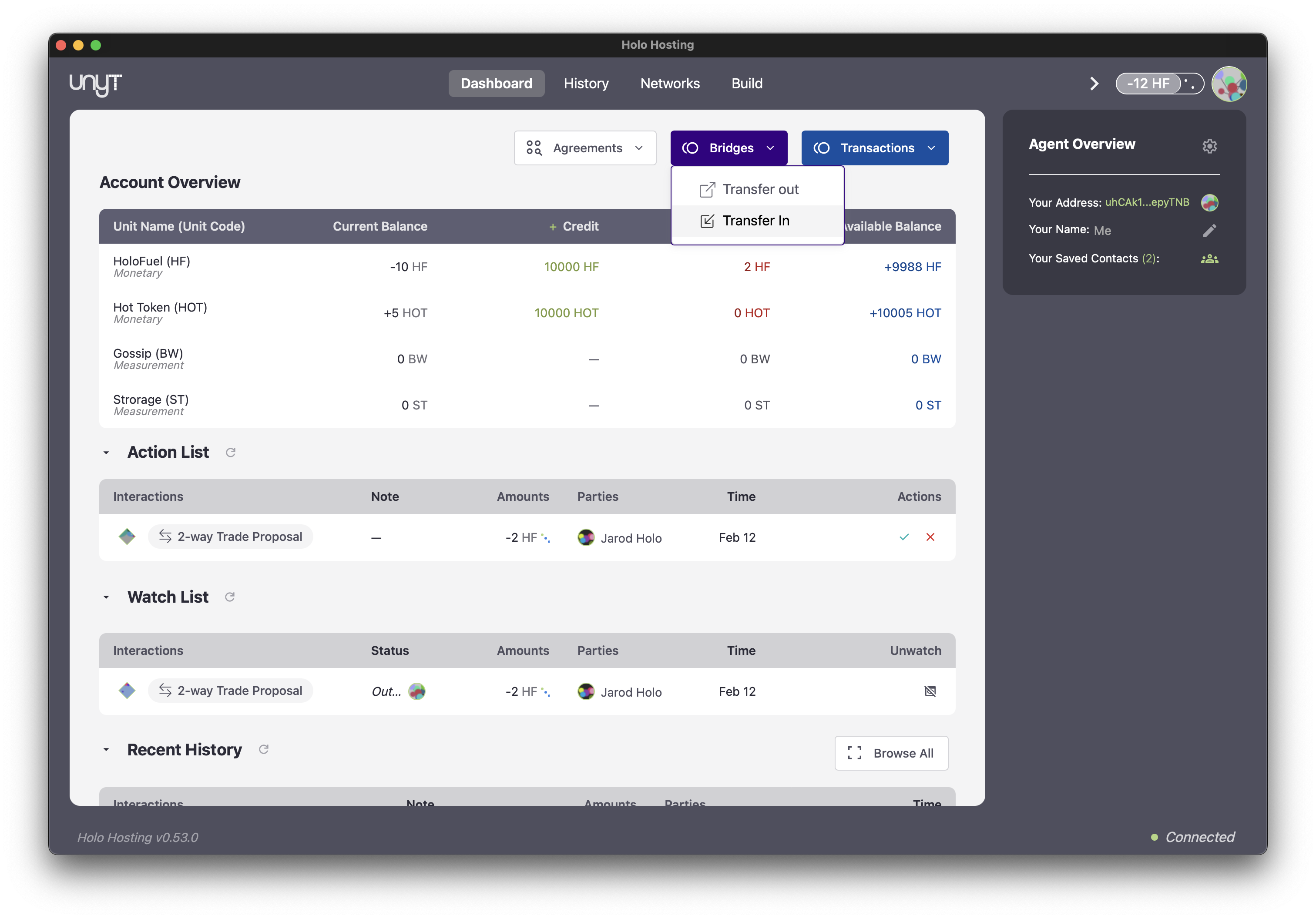
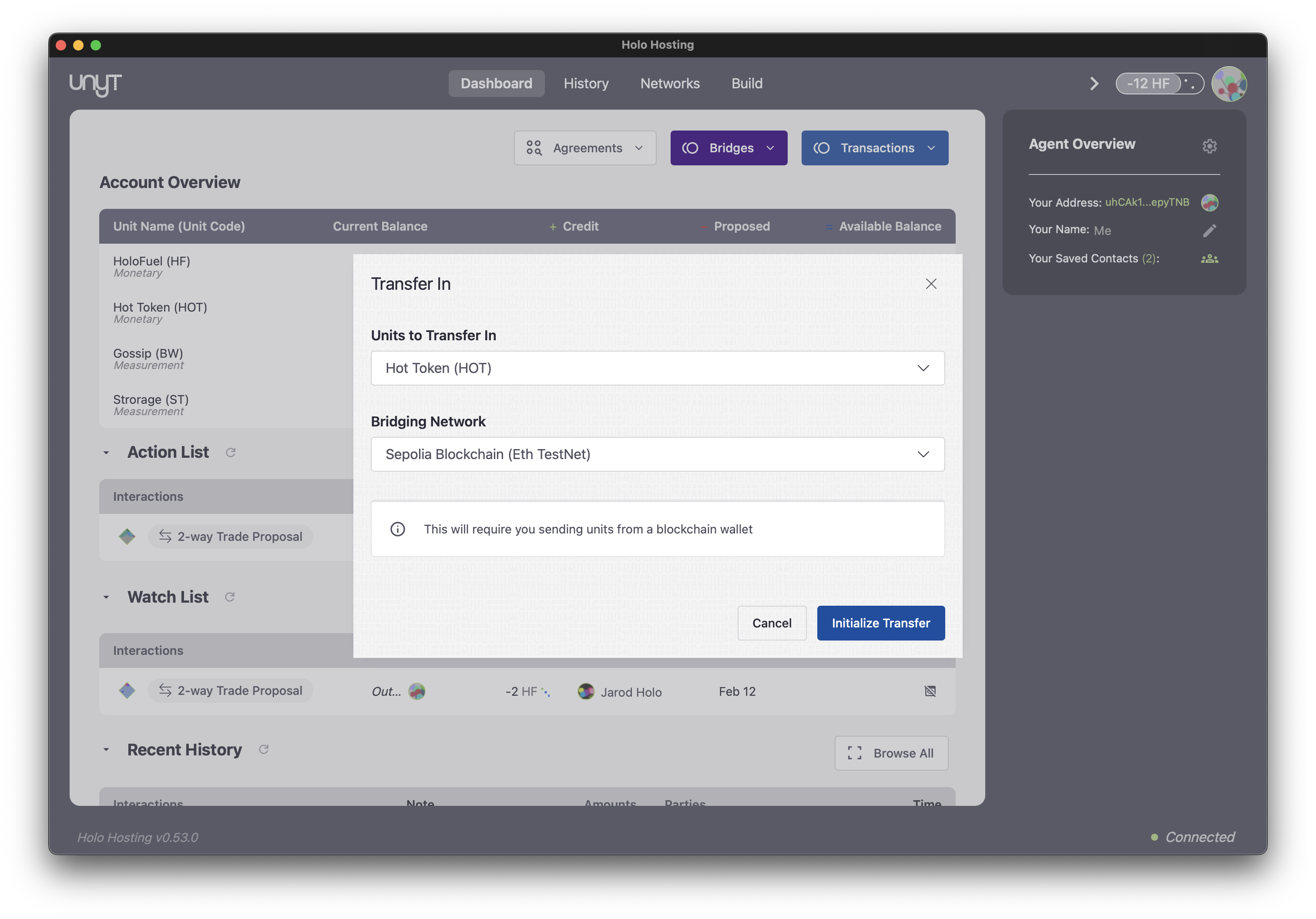
- Select the HOT unit and the Sepolia Blockchain (Eth Test Network).
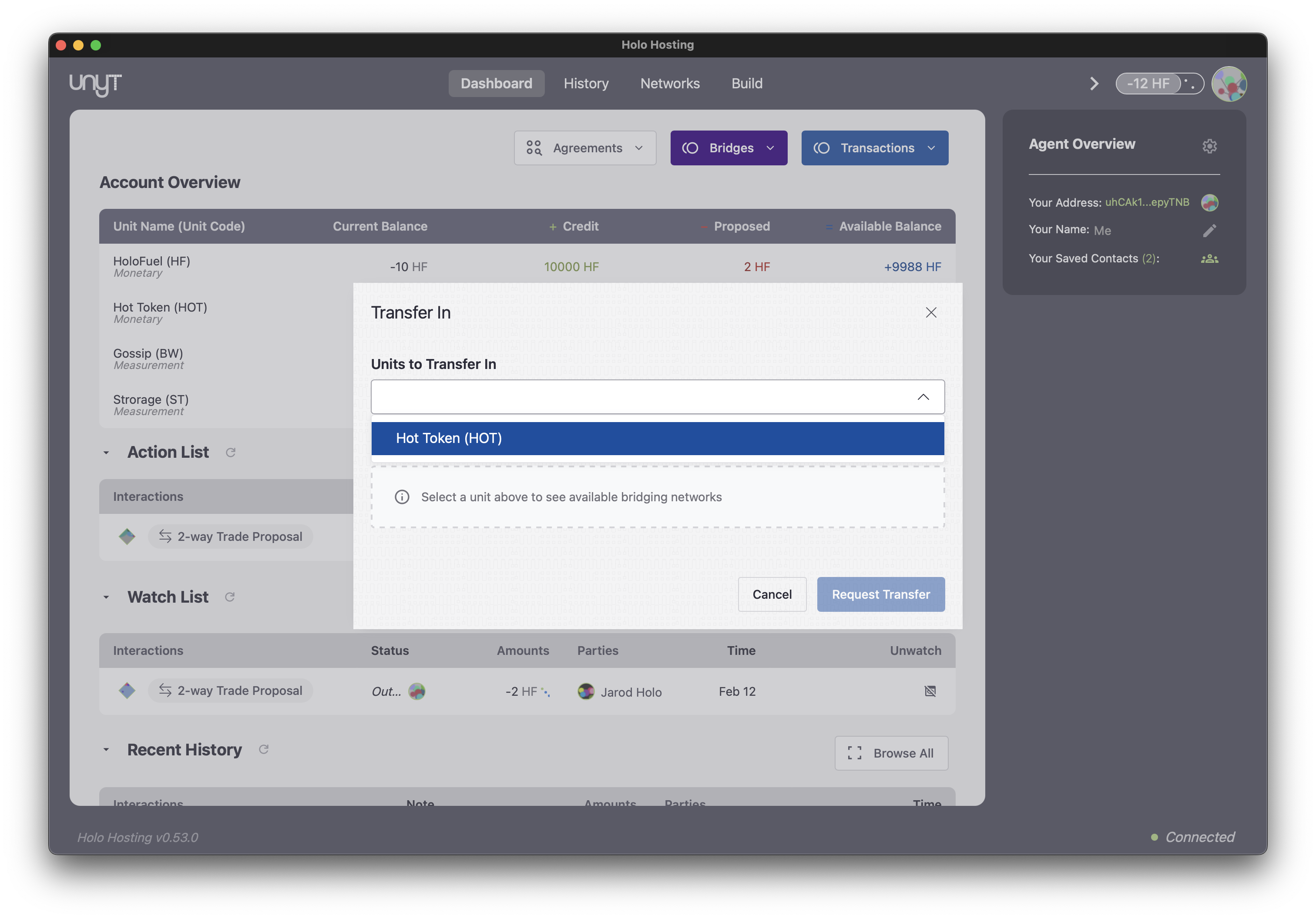
- Click Initalize Transfer
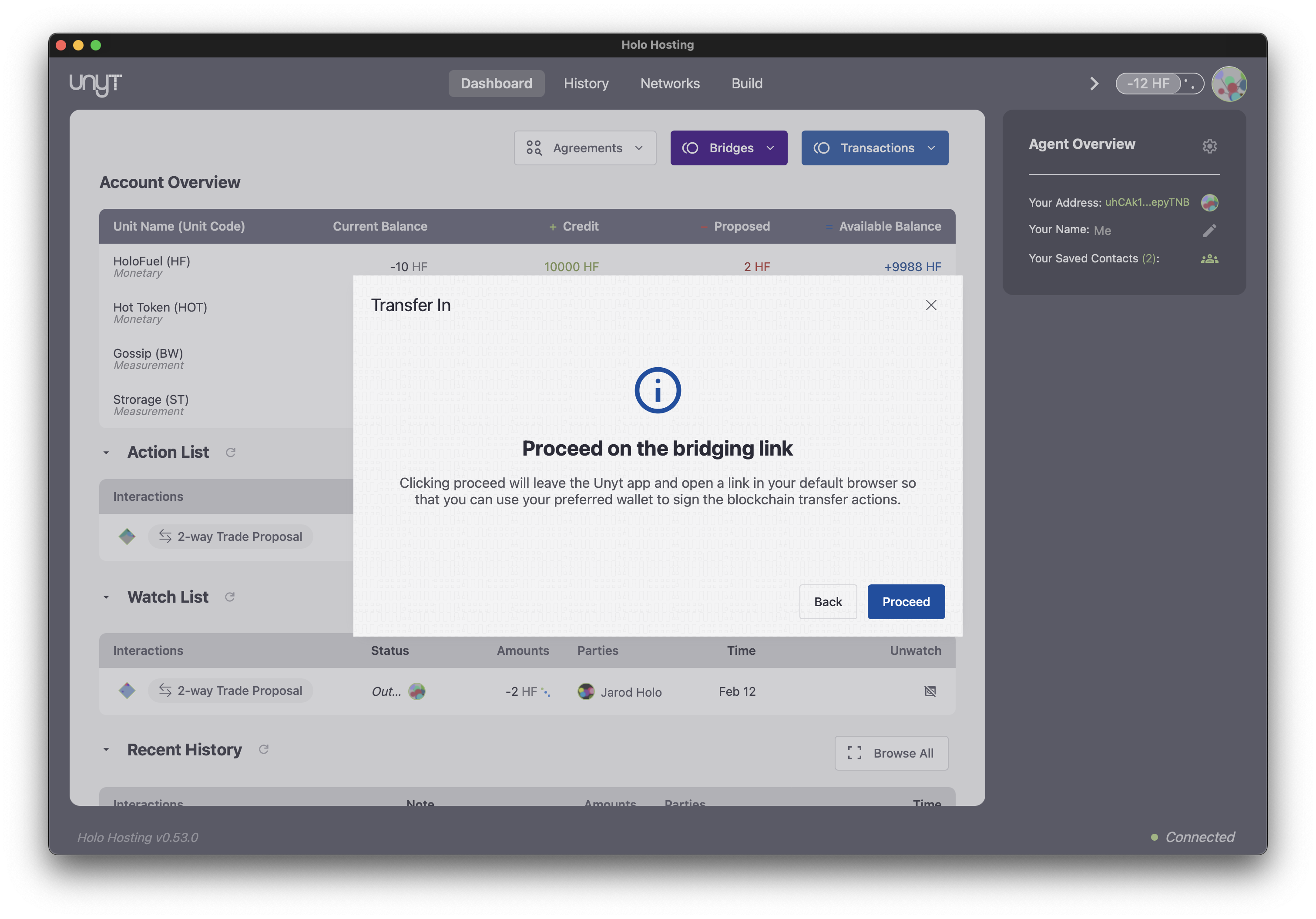
- Click Proceed to continue to the Bridge interface.
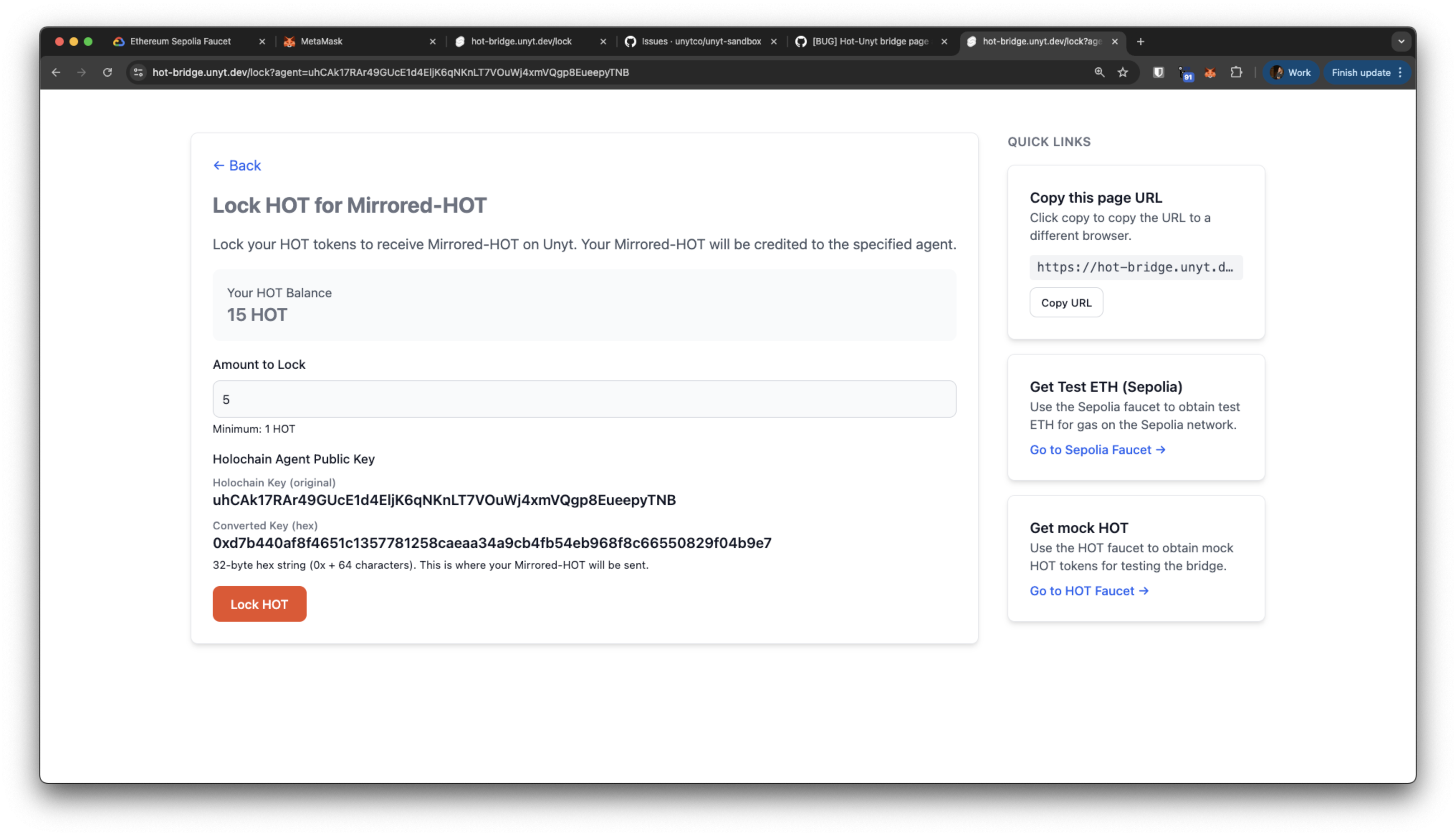
Note: If the transfer request opens in a different browser than the one with your MetaMask wallet, you can connect the wallet in that browser or click Copy this page URL to ensure no characters are missed. Then paste it into the browser where your wallet is connected.
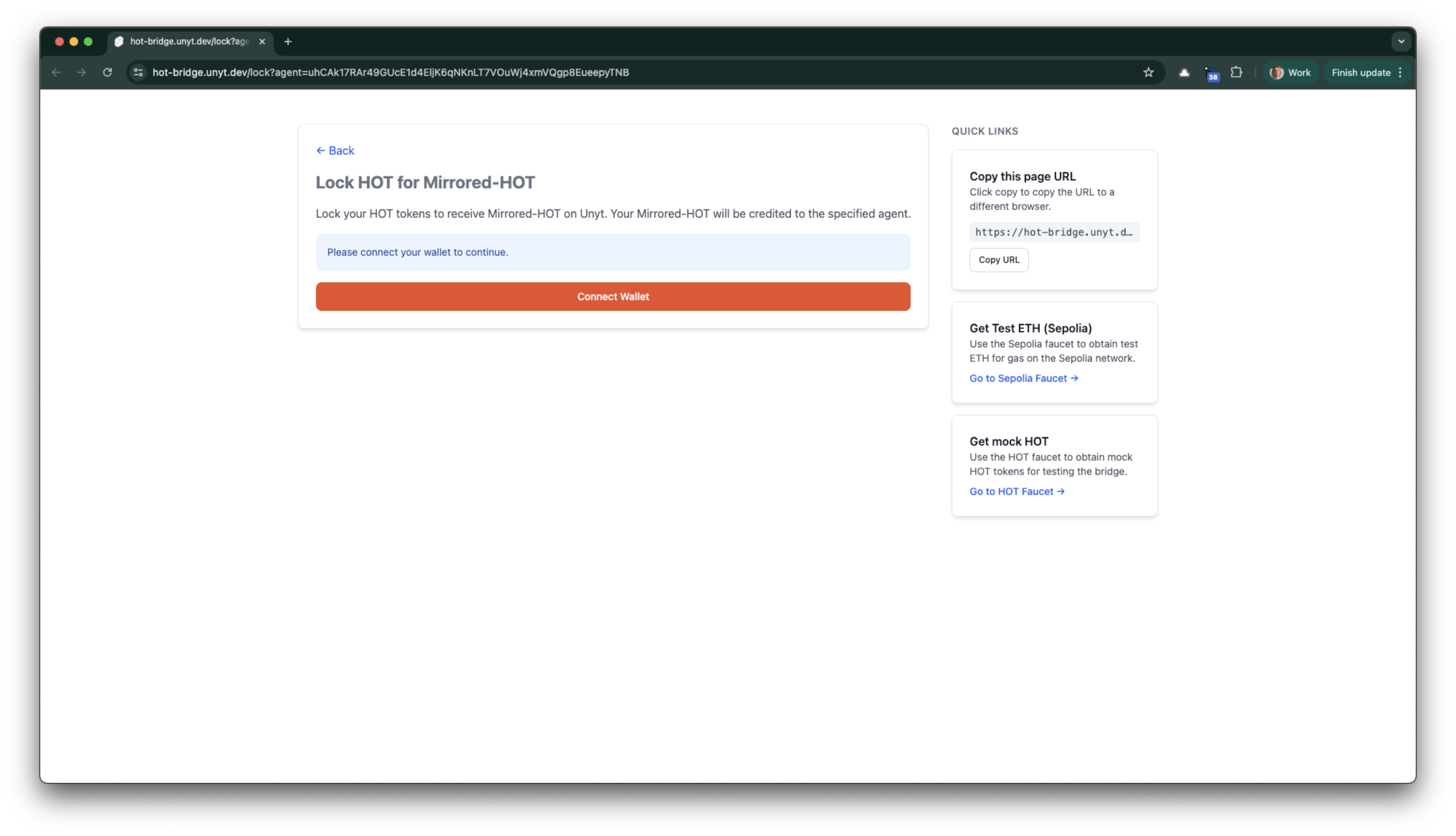
Lock Your Tokens
- Choose the amount of mock HOT to lock.
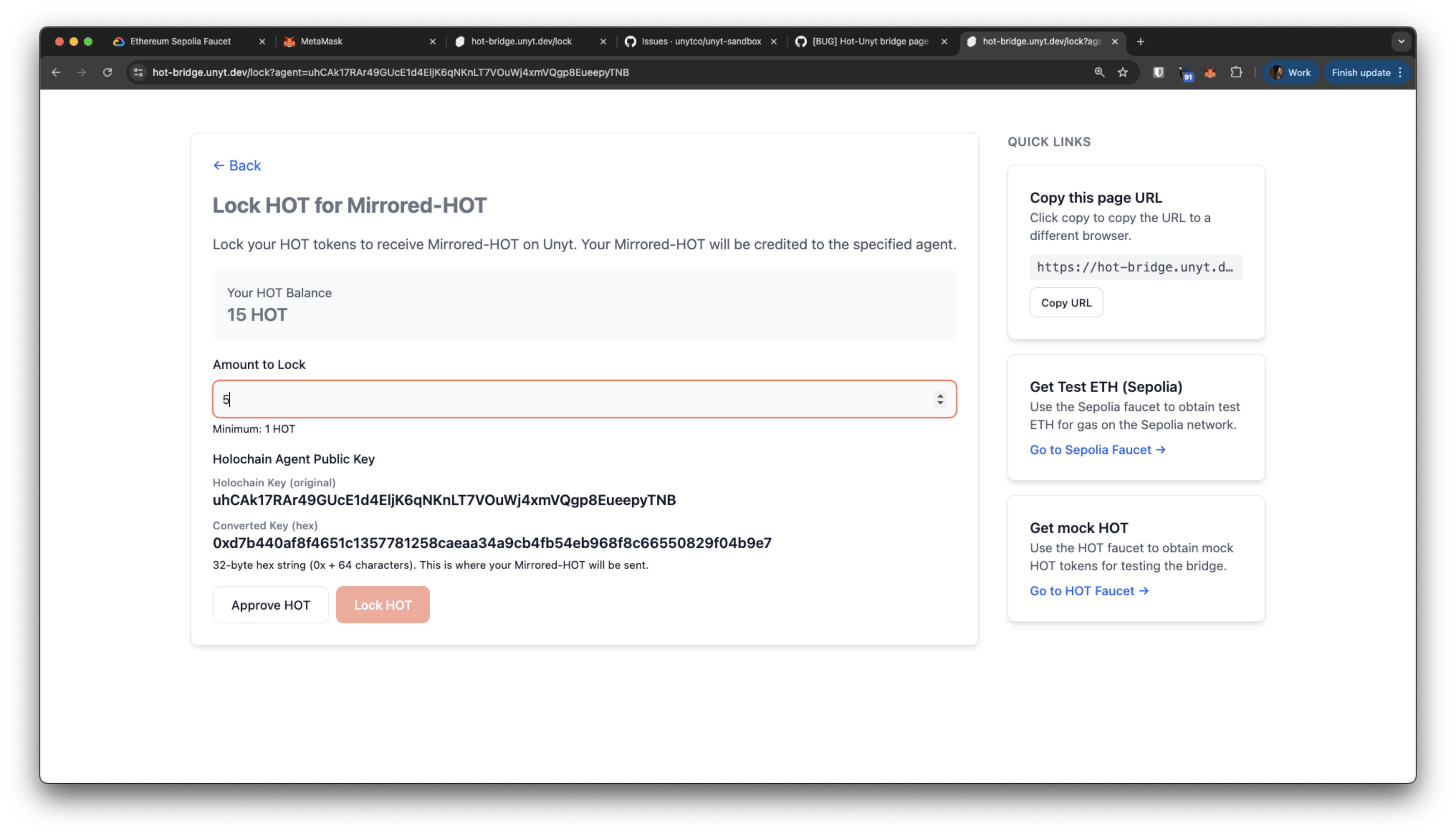
- Next you need to approve a spending cap for the HOT token. Start this process by clicking "Approve HOT".
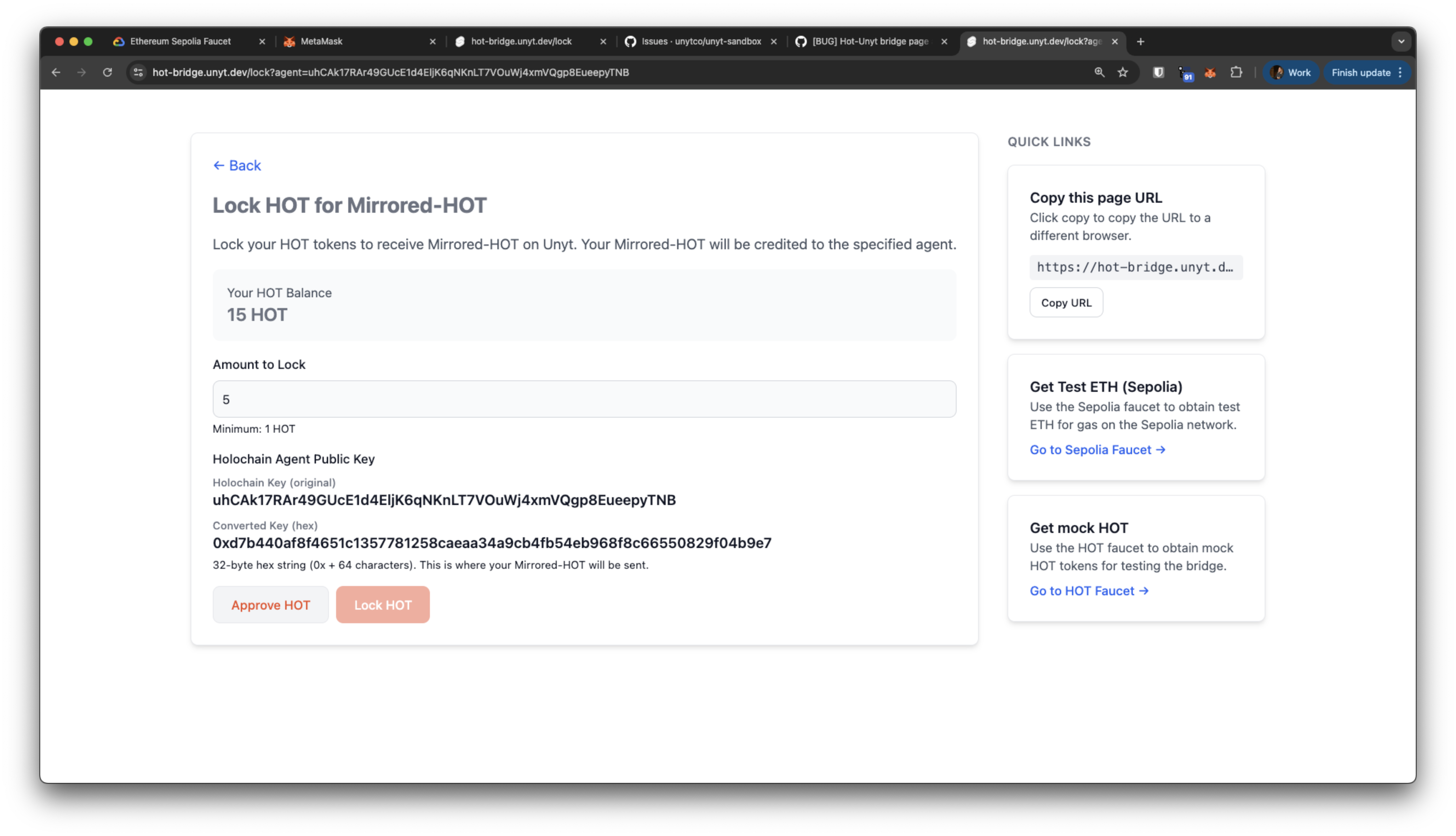
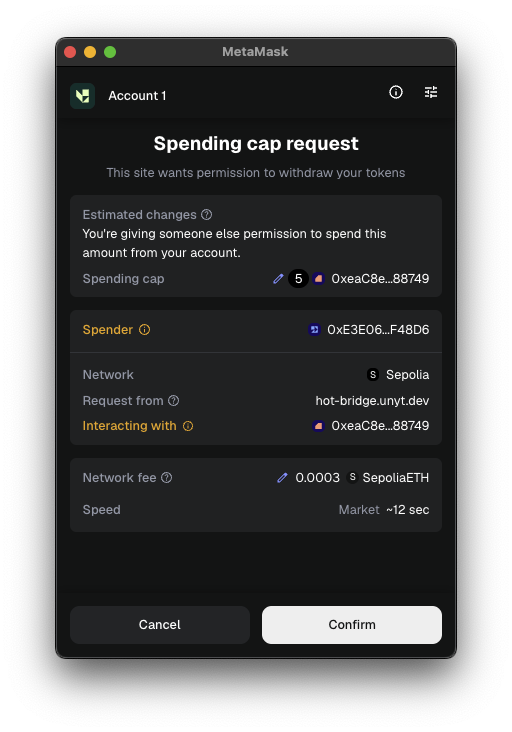
- Your wallet should open and enable you to confirm a Spending cap request with the number of HOT that you had entered.
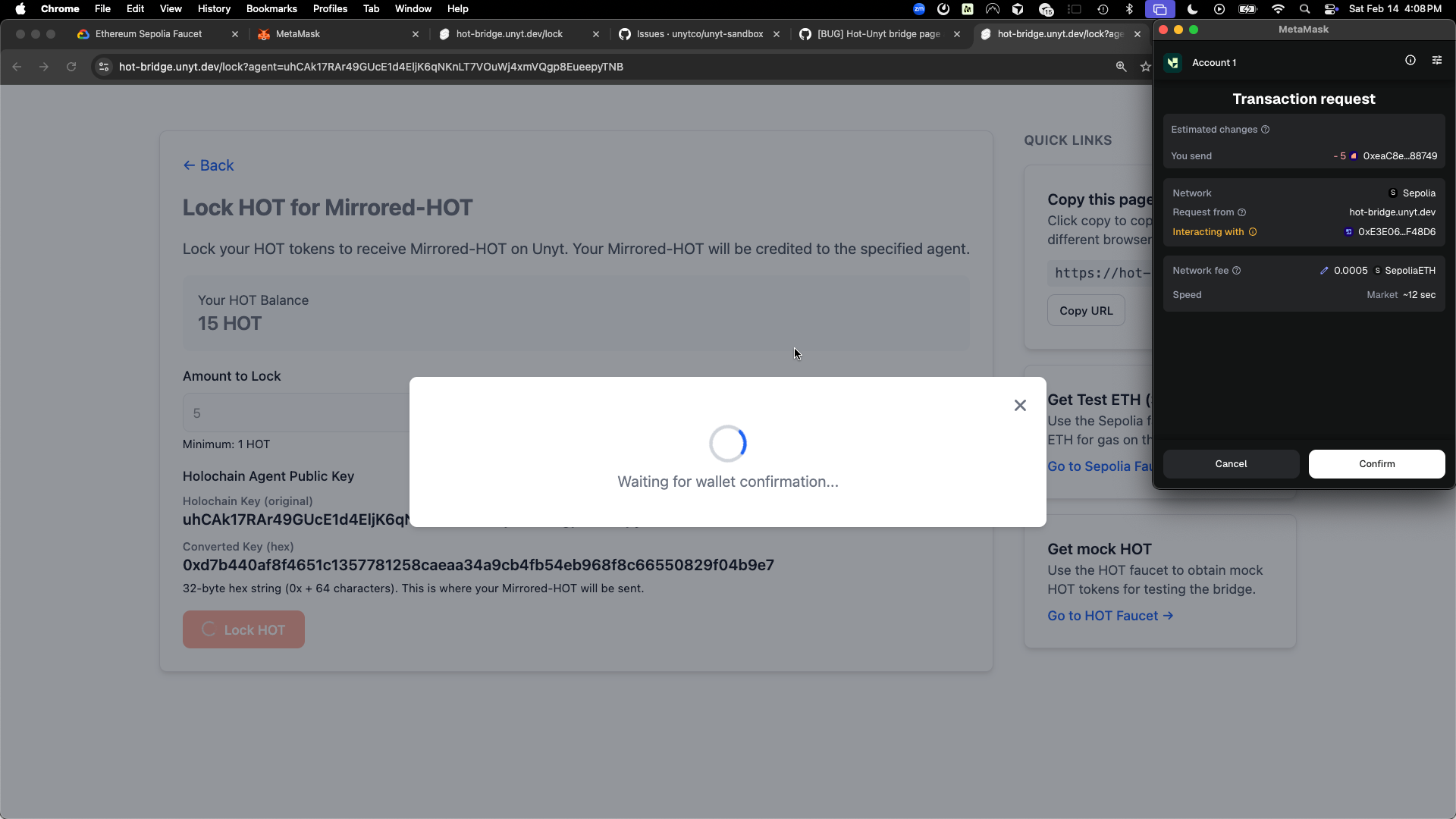
- Now that the spending cap has been authorized, click Lock HOT.
- Confirm the lock transaction in MetaMask.
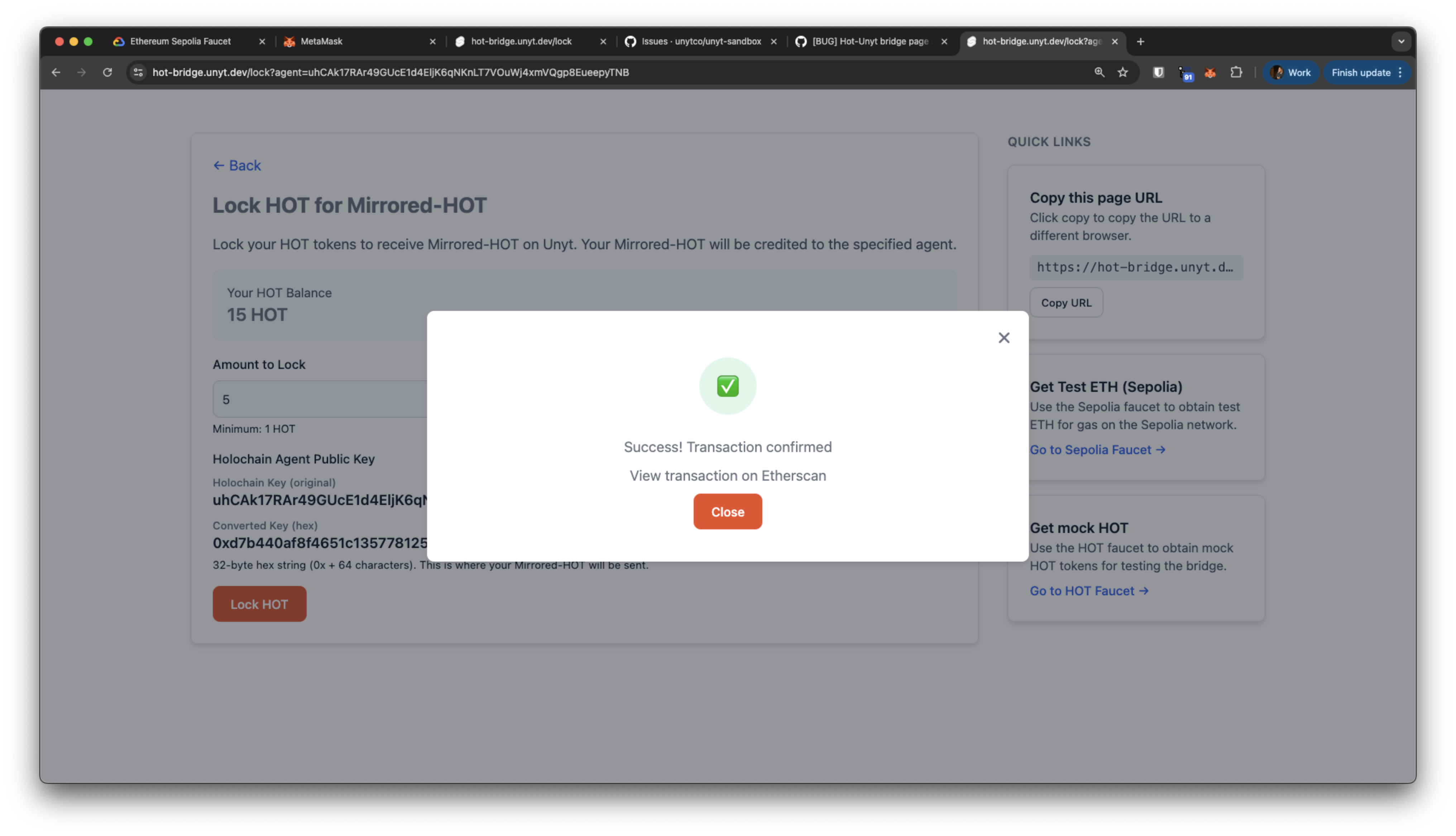
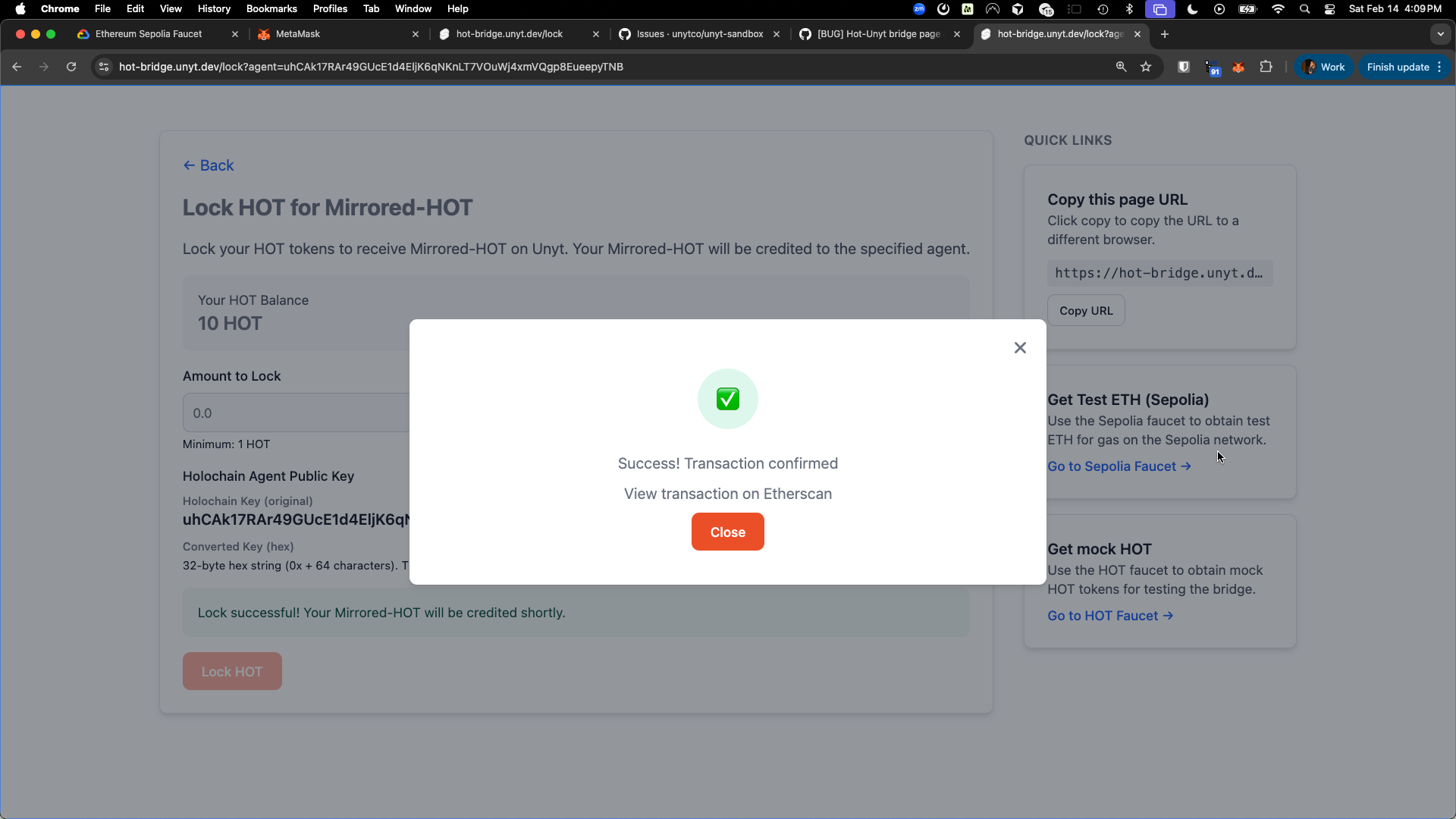
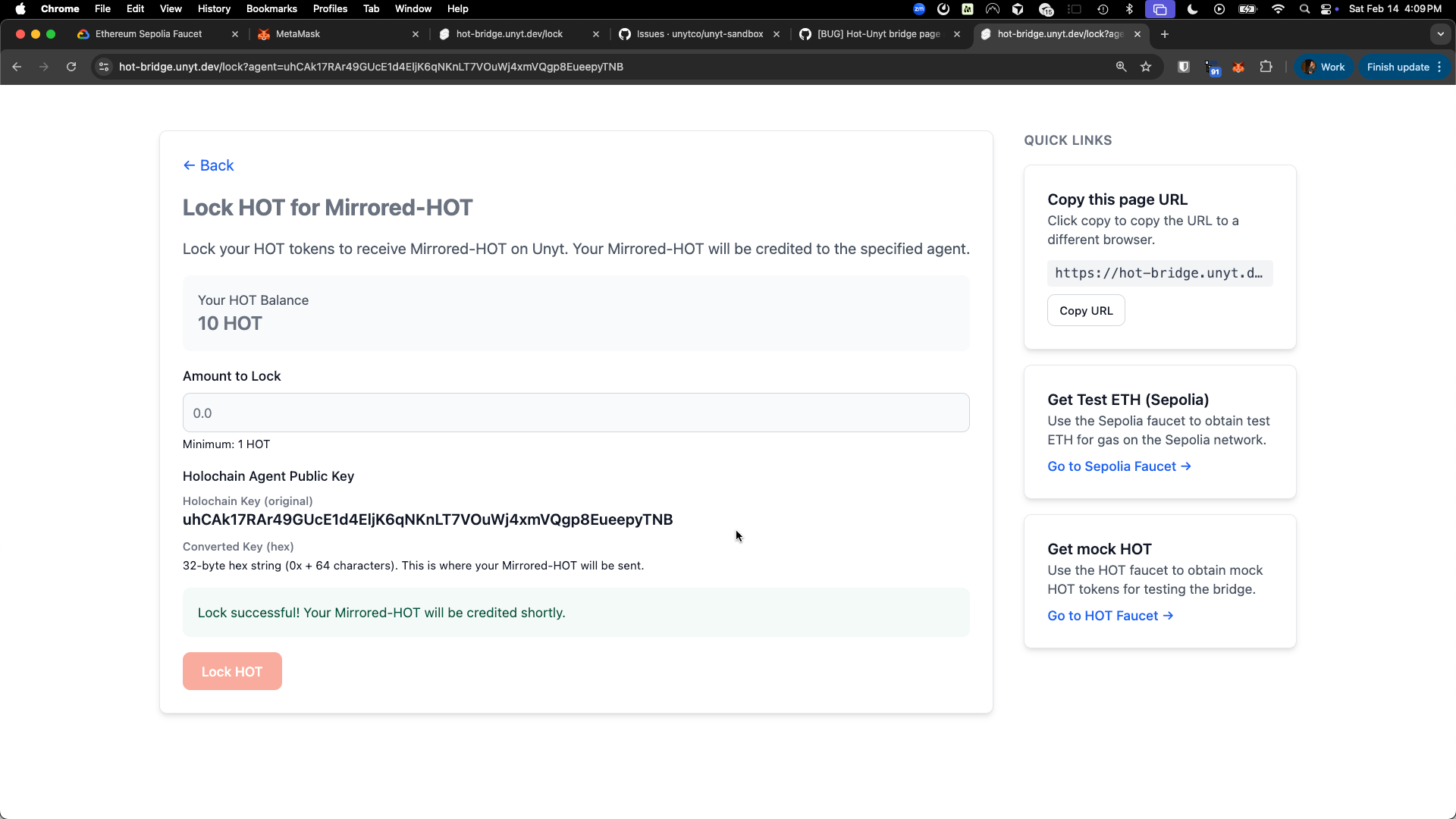
- Once the transaction is confirmed on-chain, the lock is complete.
- It may take a few minutes for the bridge agent to see the on-chain confirmation and then transfer wrapped HOT to your Unyt Holo Hosting Address.
- Back in the Unyt app, you'll see the incoming transfer in your action list.
- Accept the incoming wrapped HOT tokens.
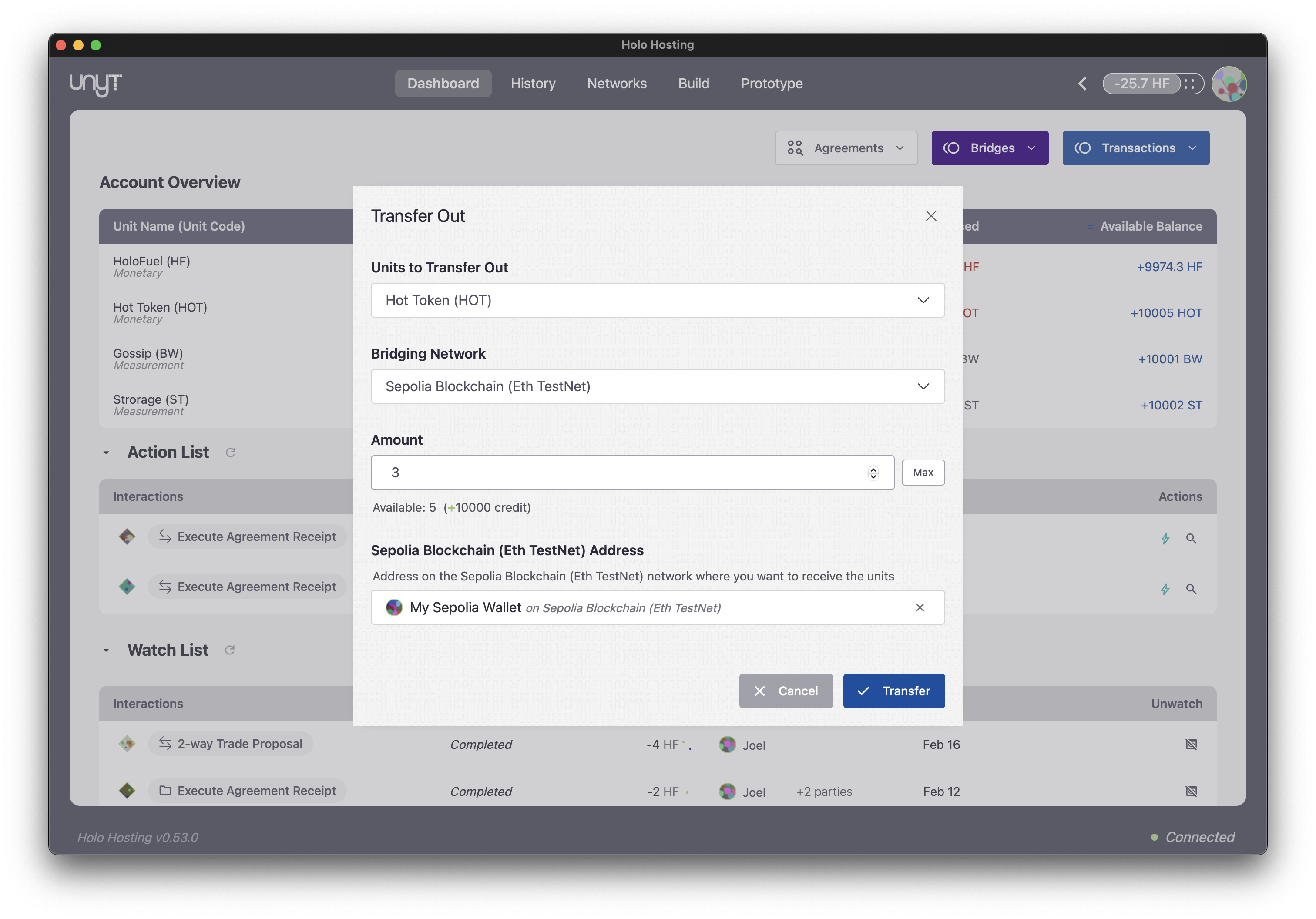
- In the Unyt app, click Bridges and then initiate a Transfer Out.
- Select the wrapped HOT unit and the Ethereum (Sepolia) bridging network.
- Enter your Ethereum wallet address as the destination. (you can copy it from metamask, under Sepolia > Receive > Ethereum > copy address)
- Confirm the transfer. The bridge agent will execute the bridge Smart Agreement and produce a cryptographic coupon — signed using EVM-native methods (KECCAK-256 hashing, ECDSA signatures).
- The coupon will appear in your Action table. Click Claim, which redirects you to your browser where MetaMask can submit the unlock transaction.
- The Ethereum smart contract independently verifies the coupon signature and releases your tokens.
Receive Wrapped Tokens in Unyt
The bridge agent monitors the blockchain, detects your lock, waits for sufficient block confirmations, and then executes a bridge Smart Agreement that credits wrapped HOT to your Unyt address.
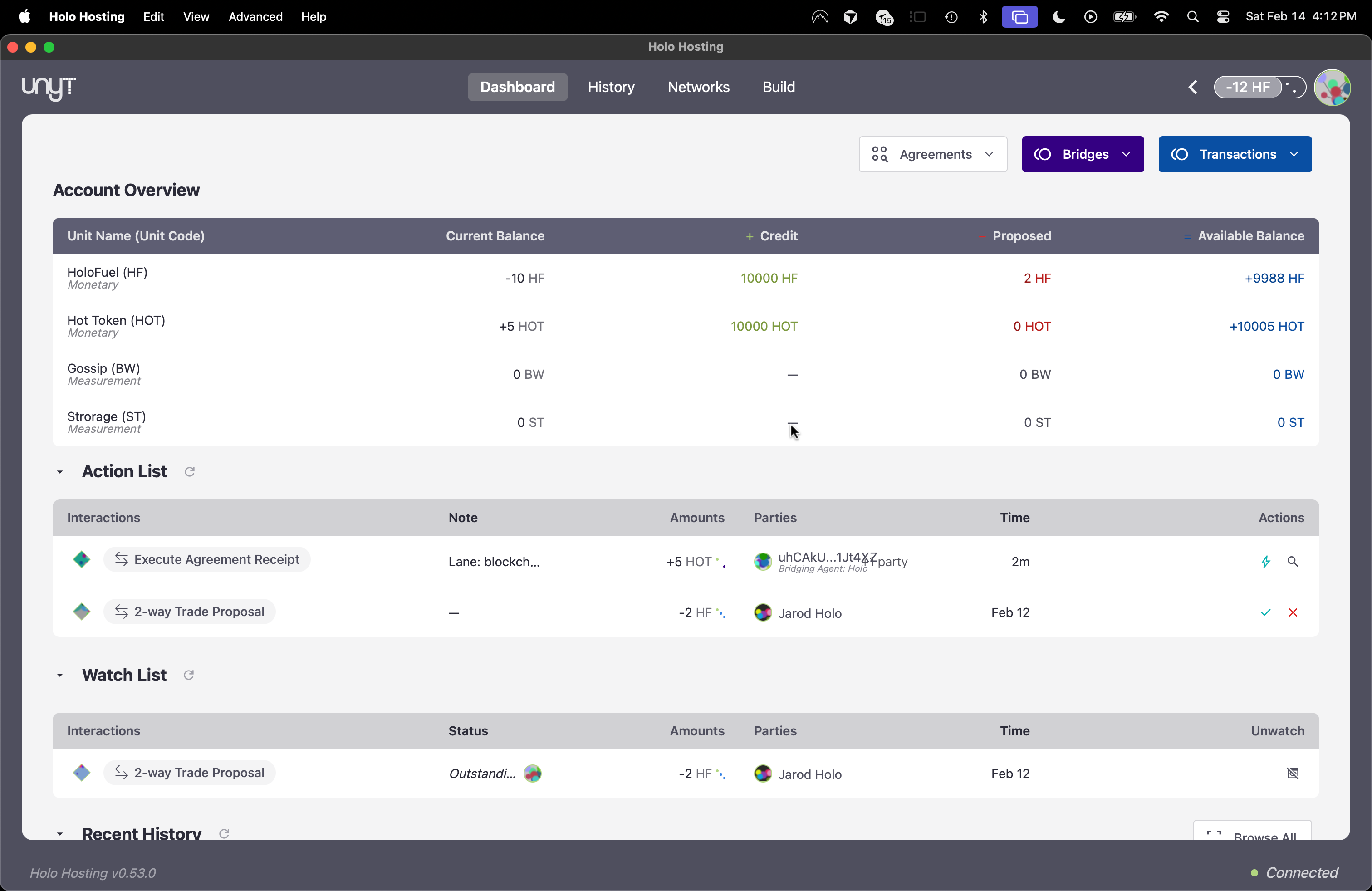
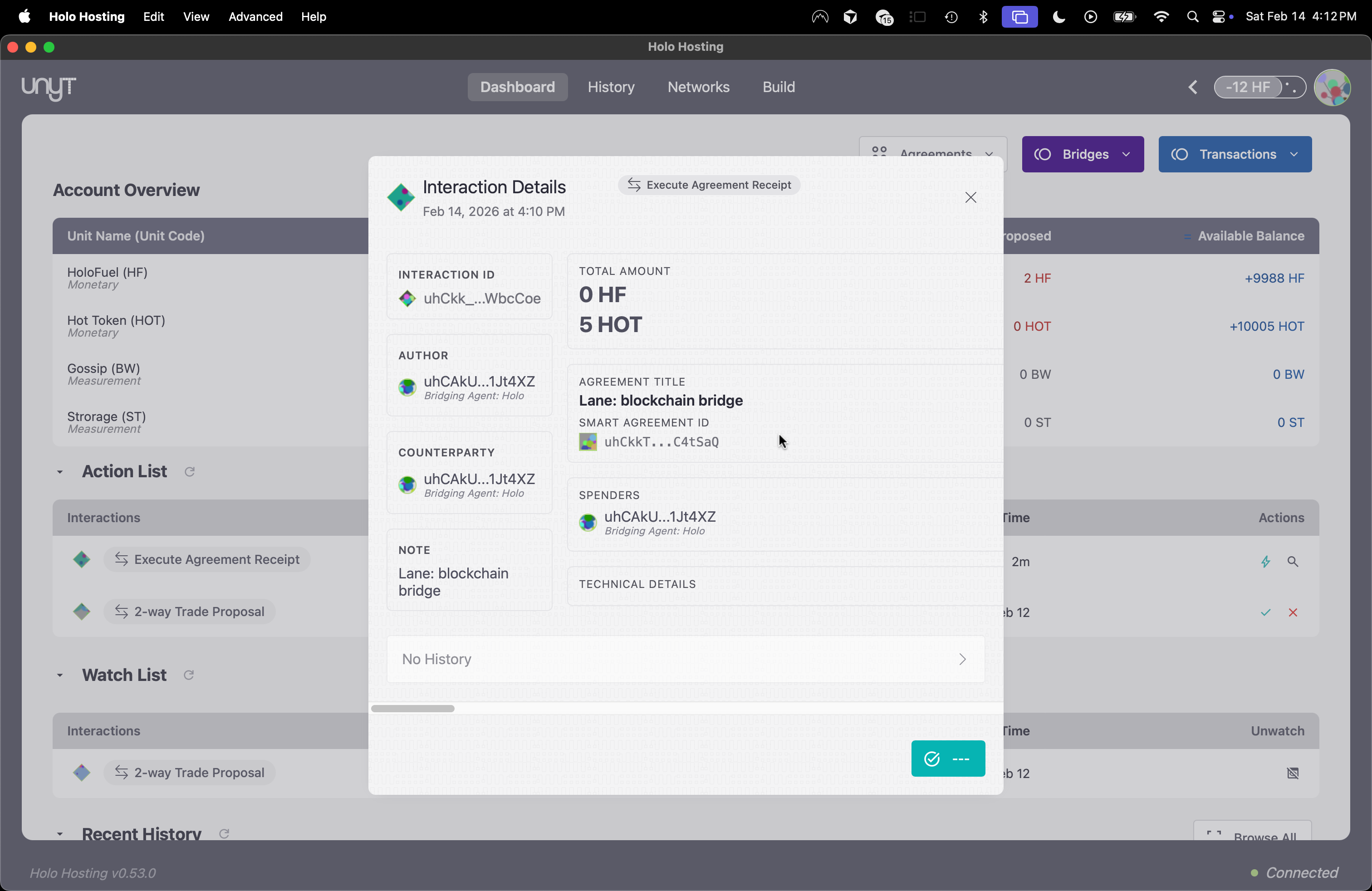
Your wrapped HOT tokens are now available in the Unyt environment — with access to smart agreements, direct trades, bridging to other Unyt apps, and customizable fees.
5. Transfer Out: Redeem in Unyt, Unlock on Ethereum
To move wrapped tokens back to the Ethereum blockchain:
Every lock and unlock is a standard blockchain transaction, visible on Etherscan or any block explorer.
How Fees Work
In Unyt, fees are entirely configurable — including the option to have no fees at all. This is a fundamental difference from blockchains and centralized payment platforms.
Why Fees Are Optional
On a blockchain, miners or validators must be compensated for processing transactions, so fees are mandatory and fluctuate with network congestion. On centralized platforms, the platform operator takes a cut. In Unyt, validation is performed by participants' own devices — there are no miners, stakers, or central servers to pay for. The infrastructure doesn't require mandatory fees to operate. The community gets to decide.
Fee Configuration
Transaction fees are defined in the Global Configuration as a percentage rate applied to Base Unit spends. The Global Config also defines a Fee Trigger — a threshold at which accumulated fees must be paid before the agent can continue transacting. Fee payment is typically handled automatically by the agent's device.
The key configuration parameters are:
- Transaction Fee Percentage — The rate applied to each Base Unit transaction (can be 0%).
- Fee Trigger — The accumulated fee amount that triggers a mandatory fee payment. Until this threshold is reached, the agent can continue transacting normally.
- Compute Transaction Fee Agreement — A System Agreement that calculates the fee. Even the fee logic itself is configurable — not just the rate.
The Fee Spectrum
- Zero fees — Set the fee percentage to 0%. Ideal for mutual aid groups, time banks, family accounting, internal organizational coordination, or any context where extracting value from transfers doesn't make sense.
- Sustainable fees — A small percentage that funds community organizers, development, or ongoing operations. The fee goes to the alliance, not just to external parties or some platform.
- Service fees — Individual Service Networks can define their own fees within their Smart Agreements, separate from the alliance-wide transaction fee. For example, a rideshare service network might charge a per-ride infrastructure fee while the underlying alliance has zero transaction fees.
Fee Computation as a Smart Agreement
The fee calculation itself is a System Agreement (Compute Transaction Fee Agreement) within the Global Configuration. Because it's a Smart Agreement, the fee logic can be customized beyond a simple percentage — the community can implement whatever fee model makes sense for their use case.
Comparison to Other Systems
- Blockchain gas fees: Mandatory, fluctuate with congestion, paid to miners/validators. Can spike unpredictably.
- Centralized platform fees: Set by the platform (Stripe ~2.9%, PayPal ~3.5%). The platform can change them at will.
- Unyt fees: Set by the community. Can be zero. Can be changed by the community's governance process. The software itself doesn't mandate any fees to Unyt — how you structure compensation, if at all, is your choice.
Further reading: Unyt on Moss (fee flexibility section), Phase 4 Testing Docs (GitHub)
Unyt Is a Template, Not a Platform
There is no global Unyt application. Each community runs their own version of Unyt, customized to their needs. We call each of these a Unyt Accounting Alliance, and each app a Unyt Alliance App.
What "Template" Means in Practice
The unyt-sandbox repository is literally designed to be forked. You clone it, update tauri.config.json (version, product name, identifier, signing keys, network seed, progenitor details), update your branding and icons, configure your Smart Agreements and Service Networks, and generate a release. The result is your app — your name, your icon, your rules.
At present, if you are interested in going through the process of setting up your own network separate from Moss and the example networks, ask for guidance in the Projects>Unyt thread on Discord or reach out and our team can help walk you through that process.
Configuration, Not Code
With different Smart Agreement sets, the same application engine becomes:
- A community giving currency (Circulo)
- A DePIN billing engine (Holo Hosting)
- A multi-project marketplace (Infrastructure Marketplace)
- A rideshare network (Barcelona/Berlin/Amsterdam demo)
- Whatever your community needs
One codebase, many configurations.
What Each Alliance Defines
Every Unyt Alliance App is independently configured. Each alliance defines:
- Its own name and branding
- Its own Base Unit (payment currency) — with a custom name and symbol
- Its own Service Units (bandwidth, storage, hours, ride-kilometers — whatever the community tracks)
- Its own Smart Agreements and economic rules
- Its own Credit Limit algorithms
- Its own Transaction Fee policies (including zero)
- Its own Service Networks (sub-communities with their own agreements and bridge agents)
- Its own Global Configuration governing all of the above
No Mandatory Platform Fees, No Lock-In
The Unyt software doesn't impose fees on your transactions, doesn't hold your data, and can't change your rules. Your alliance's economics are yours to define.
So How Does Unyt Make Money?
Unyt as a company is developing additional products and service offerings — including currency design support, implementation consulting, and other services — that projects can optionally engage with. Some projects may choose to direct a portion of their transaction fees to compensate Unyt for that work. Others may use different arrangements or none at all. The point is that it's always the community's choice, not a requirement baked into the basic Unyt software.
The Difference from Platforms
On Stripe, PayPal, or a blockchain L2, you're a user of someone else's system — their rules, their fees, their custody. They can change terms, raise prices, or shut you down. With Unyt, you're the operator of your own system. You define the rules. You set the fees. Your participants run the infrastructure on their own devices. If you choose to work with Unyt for services, that's a relationship you opt into — not a toll built into the road.
Further reading: Unyt Sandbox — "Create your own alliance" (GitHub), Unveiling Unyt Smart Agreements
Currency Design
Why Create Your Own Currency?
We can all create value — but we can't all create dollars. There's a monopoly on conventional money creation, and that monopoly shapes who can participate in the economy and on what terms.
This isn't about cryptocurrency. It's not about launching a token to speculate on. It's about something more fundamental: the ability to design formal systems that make value visible and enable it to flow where it's needed.
A neighborhood tracks hours exchanged between members. A hosting network accounts for bandwidth contributed and consumed. A cooperative splits revenue according to rules its members agreed on. Each of these is a currency — a system of accounts that shapes how value moves within a community.
Unyt gives any group the tools to design and run these systems. You choose what your unit (or units) of account represent, who can participate, what the rules are, and how governance works. The result is an economic system that reflects your community's values — not a platform's business model.
Configuring Your Currency
Every Unyt currency is configurable. You define the rules — who can participate, what limits apply, what fees (if any) are charged, and how governance works. Understanding currency design concepts will help you make better decisions when configuring your Unyt currency — particularly around issuance models, credit limits, and governance.
Design Dimensions
- Unit of account: What does your currency represent? Hours, energy, favors, dollars?
- Issuance: Mutual credit, admin-issued, earned-only, backed by locked assets, etc
- Limits: Credit limits, daily caps, balance floors
- Fees: Transaction fees, demurrage, or zero — your choice
- Membership: Open, invite-only, or token-gated
- Governance: Who can change the rules? How?
The best way to explore currency configuration hands-on is through the sandbox. The resources below provide deeper frameworks for thinking about currency design.
Arthur Brock (Co-founder of Unyt and Holochain)
Arthur Brock has spent decades exploring how currencies function as information systems — "current-sees" that make flows and patterns visible within communities and economies. His work on targeted currency design is directly relevant to anyone building with Unyt.
- Currencies are Records of Currents — The foundational insight: currencies are formal symbol systems that shape, enable, and measure real-world flows. Money is not the only currency.
- MetaCurrency Resources — A collection of essays, talks, and design frameworks covering currency DNA, gift vs. commercial transactions, wealth as a living system, and the currency system life cycle.
- Targeted Currency Design Documents — Practical case studies and design documents including regional currency models, health care currencies, and a currency design taxonomy.
Alternative Currency Projects
These real-world projects demonstrate different approaches to community and complementary currencies. They're useful reference points when designing your own Unyt currency.
- LETS (Local Exchange Trading Systems) — One of the earliest digital mutual credit models. Members trade goods and services using locally issued credits with no money changing hands. Originated in Canada in the 1980s and spread worldwide.
- TimeBanks — Founded by Edgar Cahn, timebanking uses hours as currency: one hour of service given earns one hour of service received, regardless of the type of work. Builds social capital and community resilience.
- Sardex — A B2B mutual credit network in Sardinia, Italy. Thousands of businesses trade with each other using Sardex credits, keeping value circulating in the local economy. One of the most commercially successful complementary currency systems.
- Grassroots Economics — Community currencies (Sarafu) in Kenya enabling trade in underserved communities. Demonstrates how currency design can unlock economic activity where conventional money is scarce.
General Currency Design Resources
- International Journal of Community Currency Research (IJCCR) — Academic research on complementary and community currencies
- Bernard Lietaer — Rethinking Money and The Future of Money — foundational books on complementary currency design and why monocultures of money create fragility
- Thomas Greco — The End of Money and the Future of Civilization — mutual credit, commercial exchange systems, and alternatives to bank-issued money
Architecture
Unyt runs on Holochain, a peer-to-peer framework where each participant runs their own node. There are no central servers, no blockchain consensus, and no mining.
Agent-Centric Model
Each user has their own source chain — an append-only hash chain that records every action that agent has taken, in order. Every action is cryptographically signed with the agent's private key. This chain is your identity and your record. No one else writes to it. No one can alter it without detection.
This is fundamentally different from a shared global ledger. Each agent has their own ordering of their own events. There is no single sequence that "the network" must agree on.
No Global Ledger
Einstein established over a century ago that there's no such thing as a universal ordering of events — the ordering depends on the observer's frame of reference. Holochain embraces this insight: there is no global event log that all participants must agree on. When cross-agent ordering matters (for example, to prevent double-spending), it's handled by layering validation rules for those specific contexts. This is tunable consensus for specific needs — not one-size-fits-all global consensus that creates bottlenecks.
Peer Validation
When you take an action — a payment, an agreement execution, any state change — a deterministic but random group of other agents validates that your action follows the shared rules. Validators check your source chain for integrity, verify your cryptographic signatures, and confirm that the action is legal given the current state. If you violate the rules, peers detect it and you are excluded from the network — automatically, agent by agent, as each peer independently discovers the violation.
The DHT (Distributed Hash Table)
The DHT is a shared data layer where content authored by agents is stored and retrieved by the network. Unlike a blockchain, there's no mining or consensus process to add data. Agents publish entries to the DHT; peers validate and store them. The DHT is sharded — each node stores and validates only a portion of the data, so the system scales with the number of participants rather than being bottlenecked by a single chain.
- Full Arc nodes participate in DHT storage and validation — they help the network by storing and serving data for other agents.
- Zero Arc nodes use the DHT to publish and retrieve their own data but don't contribute to storage and validation of others' data.
Benefits of This Architecture
- Parallel processing: Multiple agents can take actions simultaneously. There's no global queue or block time.
- Reduced duplication: Only relevant validators process each action, not every node on the network.
- Ordinary hardware: Runs on consumer laptops and desktops — no mining rigs, no validator stakes, no specialized infrastructure.
- Economically viable microtransactions: Without mandatory mining fees, transactions costing fractions of a cent become practical.
- Broader participation: Anyone with a computer can participate, not just those who can afford specialized equipment or large token stakes.
- Offline support: Agents can record actions to their local source chain while offline and sync when they reconnect.
Self-Custodial
Your private keys are stored in a local keystore (Lair) on your device. No third party holds your funds or controls your account. Others can't force credits on you — you must explicitly Accept any incoming funds. Fraud requires your active collusion and your cryptographic signature. There is no "admin override" that can move your funds without your key.
How Integrity Works Without Global Consensus
Integrity is maintained through multiple reinforcing mechanisms:
- Signed source chains — every action is signed and hash-linked, making tampering detectable
- Deterministic peer validation — validators are selected algorithmically, not chosen by the actor
- Conservation of units — in every RAVE, units in must equal units out. Value cannot be created or destroyed outside the defined rules.
- Independent verifiability — any agent can re-run an agreement execution and confirm the outputs match
The result: cheating is detectable and provable without needing everyone to agree on a single version of history.
Further reading: Intro to Smart Agreements (GitHub), Holochain Developer Docs
Glossary
Key terms used throughout this documentation and the Unyt ecosystem.
- Agent
- A participant in a Unyt network. Each agent is identified by their cryptographic key pair and maintains their own source chain of signed actions.
- Agent Key
- The public/private key pair that uniquely identifies an agent. Generated on first launch and stored in a local keystore (Lair). Used for signing transactions, verifying identity, and all interactions.
- Base Unit
- The primary unit of account within a Unyt Alliance — the payment currency. Each alliance defines its own Base Unit with a custom name and symbol (e.g. "HoloFuel," "Ride Euro," "Spore").
- Service Unit
- A quantifiable unit for tracking specific services within an alliance. Examples: bandwidth (GB), storage (TB-months), compute hours, ride-kilometers. Service Units are tracked alongside Base Units but serve different purposes.
- Credit Limit
- The amount an agent is allowed to spend into the negative. Determines how much credit (spending capacity) each participant has. Can be set statically or calculated dynamically by a Smart Agreement.
- Smart Agreement
- Programmable economic logic — a specific implementation that binds an Agreement Code Template to roles, input sources, and execution rules. See How Smart Agreements Work.
- Agreement Code Template
- Reusable logic consisting of an input schema, execution code ([RHAI](https://rhai.rs)RHAI), and output schema. Templates are shared across agreements and published to the alliance's Library.
- RAVE (Recorded Agreement Verifiably Executed)
- The immutable artifact produced when a Smart Agreement executes. Contains inputs, the agreement reference, and outputs. Any participant can independently verify the execution. Also referred to as SAVED (Smart Agreement Verifiable Execution Doc) in some contexts.
- Executor
- The agent who triggers the execution of a Smart Agreement. May be any agent or restricted to authorized agents, depending on the agreement's configuration.
- Role
- A named position within a Smart Agreement (e.g. "sender," "receiver," "service provider"). Roles determine who provides inputs, who receives outputs, and what qualifications are required.
- Global Config
- The alliance-wide configuration that defines Base Unit settings, credit limit algorithms, transaction fee policies, system agreements, and other foundational parameters. Set by the progenitor and modifiable through governance.
- Service Network
- A sub-community within a Unyt Alliance with its own configuration, Smart Agreements, Bridge Agents, and services. Enables specialized functions (hosting, marketplace, rideshare) within the broader alliance.
- Bridge Agent
- An authorized agent within a Service Network responsible for managing the flow of units between two Unyt Alliances or between a Unyt Alliance and an external blockchain.
- Transaction Fee
- A configurable percentage applied to Base Unit transactions. Can be zero. Accumulated fees are paid automatically when they reach the Fee Trigger threshold. The fee calculation itself is a Smart Agreement.
- Data Record
- Structured data stored within the alliance — conversion tables, recipes, code sheets, and other reference data used by Smart Agreements and the application.
- Unyt Accounting Alliance
- A community running a customized Unyt application with its own rules, currencies, and governance. There is no global Unyt — each alliance is independent.
- Unyt Alliance App
- The specific application a Unyt Accounting Alliance runs. Built by forking the unyt-sandbox repository and configuring it to the alliance's needs — its own name, branding, Smart Agreements, and rules.
For a comprehensive glossary of all Unyt terms, see the Unyt Dictionary on GitHub.